Rings are actually one of my least used items in my playing of the classic Rogue. They tend to be risky as they increase food consumption and a cursed ring just won’t come off. Still, they’re part of the game and a great challenge for this project so I decided to add them to the inventory list. They also have continuous effects while worn so I had to come up with a new way to integrate them into the code and enable the player to wear or remove them. Also, in this chapter, I come up with another way to vary the properties of inventory items such as the ring’s Increment property.
This post is part of a series on creating a roguelike game in C#. For the latest chapters and more information, please visit the Official Project Page on AndrewComeau.com. The current code for this project is also available on Github.
Don’t miss the next chapter! Subscribe for free on Substack to be notified when new chapters are posted.
Reaching for the tiger-eye ring
I started thinking about how to implement ring powers in the game and realized that delegate methods won’t quite work. In the original Rogue, rings alter a player’s abilities when they’re put on either hand and those enhancements last until the player decides to remove the ring, if it can be removed as some are cursed, and the effects have to be factored into various parts of the game.
- The Ring of Add Strength increments or decrements (if cursed) a player’s strength while it’s on.
- The Ring of Protection works during combat to protect from hits by monsters.
- The Ring of Searching works continuously to reveal entrances, traps, etc..
- The Ring of Slow Digestion works continuously to double the length of time before food is required.
There are eight others that I’m choosing to include in this version.
Obviously, a delegate that’s run one time isn’t going to work for providing a ring-dependent strength bonus or continuous effects on hunger or searching and I’m not going to add properties that have to be set and maintained in addition to the LeftHand and RightHand properties that hold the rings themselves.
What I could do is add functions that examine those two properties and can be factored into calculations from any point in the game. For example, a TotalStrength() integer function could calculate the player’s final strength rating based on their current strength, strength mod and whether they’re wearing the Ring of Add Strength. A Protection function could look for the Ring of Protection.
Over time, functions like these could adapt to factor in other game conditions that affect the same characteristics or grant the same abilities. Another advantage is that these functions can reside in the Player class instead of the Game class and don’t even have to be static like the monster special attacks. They also don’t have to have the same return type or parameters.
Yeah, that sounds like a plan.
Forging the Rings
Let’s run through the new inventory drill again. First, we update the InvTemplateID enumeration in the Inventory class. This enumeration has a member for each inventory item and provides an identifying constant that will refer to it throughout all classes and keep the inventory listing in order.
// Rings
RingOfAddStrength = 36,
RingOfProtection = 37,
RingOfSearching = 38,
RingOfIncreaseDamage = 39,
RingOfMaintainArmor = 40,
RingOfRegeneration = 41,
RingOfSlowDigestion = 42,
RingOfStealth = 43,
RingOfSustainStrength = 44,
RingOfTeleportation = 45,
RingOfAggravateMonster = 46,
RingOfAdornment = 47,
To this point, delegate methods have often returned a message to be displayed when the player uses an item like a scroll. Since I won’t have delegates for rings and I’m not making them just to display a message, I’m giving the Inventory class two new properties, strings to be displayed when the item is put to use or put away. For now, I’ll just use these for rings but they could add some personality for other items, too – or even replace delegate methods.
/// <summary>
/// Optional message to display when item is put to use.
/// </summary>
public string ActivateMessage { get; set; }
/// <summary>
/// Optional messsage to display when item is put away.
/// </summary>
public string DeactivateMessage { get; set; }
The next step is to add the rings to the list of inventory templates in Inventory.LoadInventory(). Here are a couple of examples.
new Inventory(InvCategory.Ring, InvTemplateID.RingOfAddStrength, "", "Add Strength", "Add Strength", false, true, false, false, false, false, 0, 1, 0, 0, 0, 0, 0, 25, 0, new MapGlyph('ö', Color.Orange, Color.Black), "You feel a little stronger now.", "You feel a little weaker."),

new Inventory(InvCategory.Ring, InvTemplateID.RingOfAdornment, "", "Adornment", "Adornment", false, true, false, false, false, false, 0, 0, 0, 0, 0, 0, 0, 25, 0, new MapGlyph('ö', Color.Orange, Color.Black), "Such a stylish ring ... it reflects the torchlight nicely.", "It really was kind of useless."),
Now, let’s come up with a quick function for the RingOfAddStrength.
/// <summary>
/// Get the player's actual strength with any rings and other bonuses.
/// </summary>
/// <returns></returns>
public int TotalStrength()
{
    int retValue = 0;

    retValue = this.CurrentStrength;

    if (this.LeftHand != null && this.LeftHand.PriorityId == RingOfAddStrength)
        retValue += this.LeftHand.Increment;

    if (this.RightHand != null && this.RightHand.PriorityId == RingOfAddStrength)
        retValue += this.RightHand.Increment;

    return retValue;
}
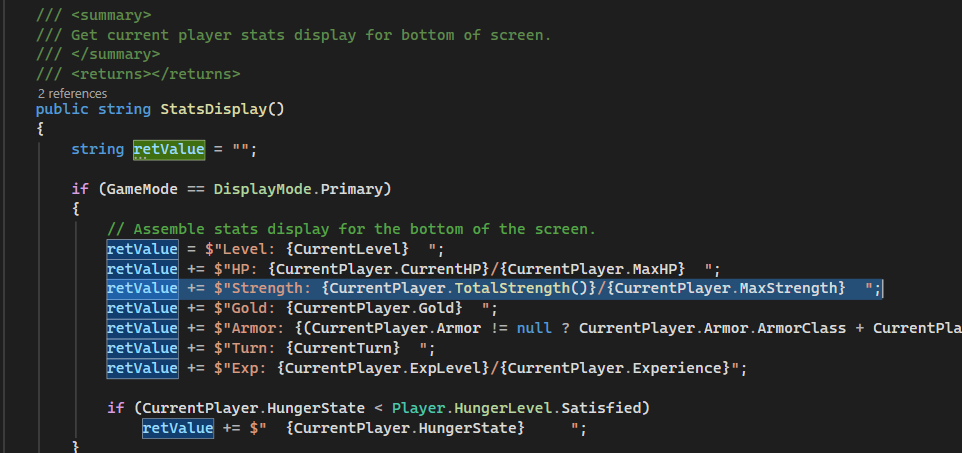
The Player class already has a read-only CurrentStrength property that combines the MaxStrength and StrengthMod properties to get the player’s strength after Rattlesnake bites and potions. This function starts with that property and then looks for the RingOfAddStrength on each hand. If it’s found, the function adds the ring’s Increment value to the return value.
“Nice ring … what do I do with it?”
At this point, I realized I still didn’t have a way for the player to actually use the rings so I needed to back up and add the commands to the program. First, we need a few more key constants in the Game class.
private const int KEY_P = 80;
private const int KEY_LBRACE = 123;
private const int KEY_RBRACE = 125;
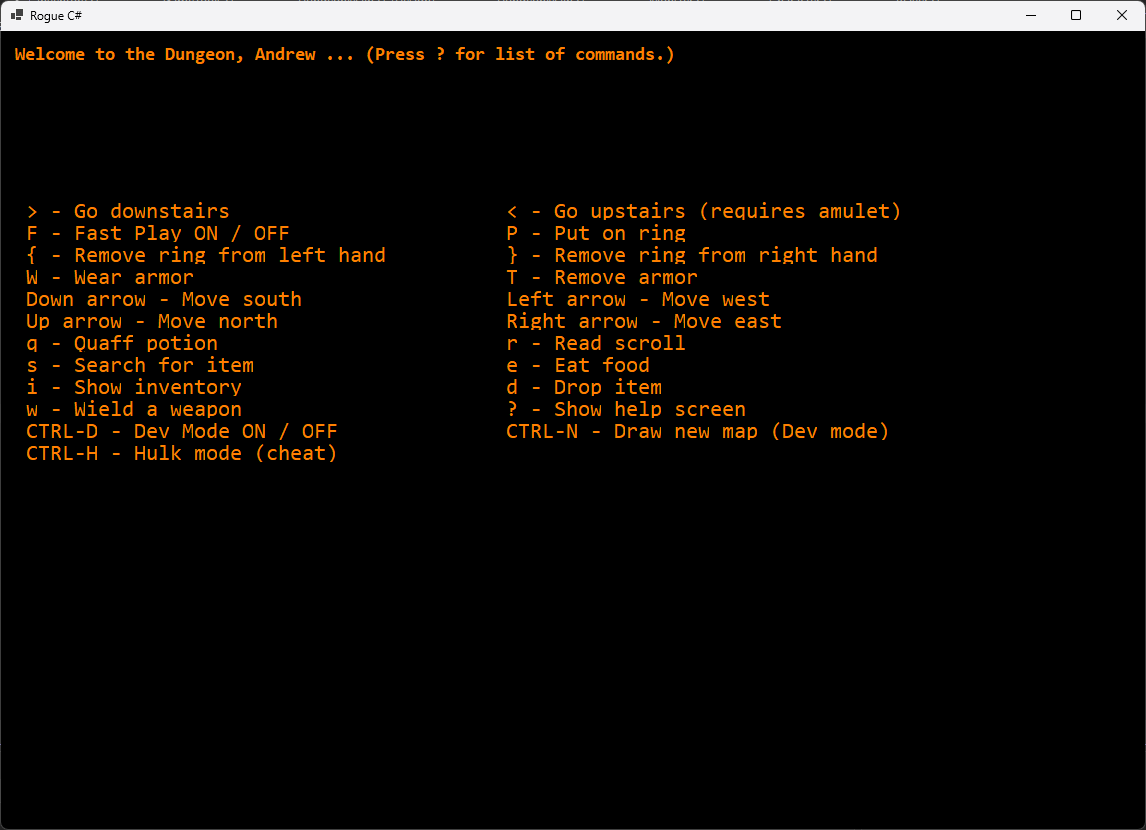
The classic game uses an uppercase ‘P’ as the command to put on a ring and uppercase ‘R’ to remove it (lowercase ‘r’ reads a scroll). It would also give the player the choice of which hand to add a ring to or remove. I’m having this game choose the hand to put the ring on and using separate keys for removing one from the left or right hand. This is mostly to avoid the need for another user input that would complicate the screen modes. The Game.InitializeCommands() method then gets a couple of new entries in the KeyActions dictionary.
{new recKeyChord(KEY_P, false, true), (WearRingProc, "P - Put on ring")},
{new recKeyChord(KEY_LBRACE, false, true), (RemoveRingProc, "{ - Remove ring from left hand")},
{new recKeyChord(KEY_RBRACE, false, true), (RemoveRingProc, "} - Remove ring from right hand")},
This automatically adds them to the help screen as the HelpScreen() function pulls the text from this dictionary.
The WearRingProc() method is a delegate that starts a turn and then calls the PutOnRing() method which is closely based on WearArmorProc() except that it has to check both the left and right hand properties.
private bool PutOnRing(char? ListItem)
{
    bool retValue = false;
    string hand = "";
    List<Inventory> items;

    if (GameMode != DisplayMode.Inventory)
    {
        if (CurrentPlayer.LeftHand != null && CurrentPlayer.RightHand != null)
            UpdateStatus(" You have rings on both hands. You must remove one first.", false);
        else
...
The method also decides which hand to put the ring on, based on which is free and prioritizing the left hand, and decides if it’s cursed just before it goes on the hand. There is a 15% chance of a ring acquiring a curse when put on if it’s not protected. (I’ll be rethinking this later in this chapter.)
...
// If the player selects a valid item, add it as their armor and decide if it's cursed.
if (!items[0].IsProtected)
    items[0].IsCursed = rand.Next(1, 101) <= ITEM_CURSE_PROB ? true : false;
else
    items[0].IsCursed = false;

if (CurrentPlayer.LeftHand == null)
{
    CurrentPlayer.LeftHand = items[0];
    hand = "left";
}
else if (CurrentPlayer.RightHand == null)
{
    CurrentPlayer.RightHand = items[0];
    hand = "right";
}
else
    UpdateStatus(" You have rings on both hands. You must remove one first.", false);

if (hand.Length > 0)
{
    UpdateStatus($"You are now wearing {GameInventory.ListingDescription(1, items[0])} on your {hand} hand.", false);

    // If there's an activation message, might as well identify the item.
    if (items[0].ActivateMessage.Length > 0 && !items[0].IsIdentified)
    {
        SetInventoryAsIdentified(items[0].PriorityId);
        UpdateStatus(items[0].ActivateMessage, false);
    }
}
So far, so good …
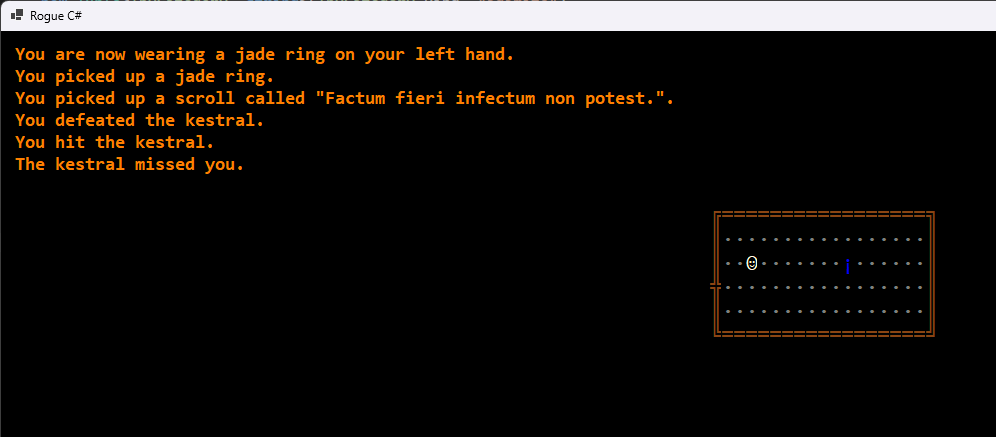
As with scrolls, potions and other items, the program randomly assigns code names to unidentified items from the CodeNames List in the Inventory class. In this case, rings are identified by a random type of stone until a Scroll of Identify is used.
Ring around the code
So, we have a function called RingOfAddStrength() and we need it to call it from somewhere. In this case, it makes sense to replace references to the CurrentStrength property with calls to the function. Visual Studio makes it easy to find all three of them.
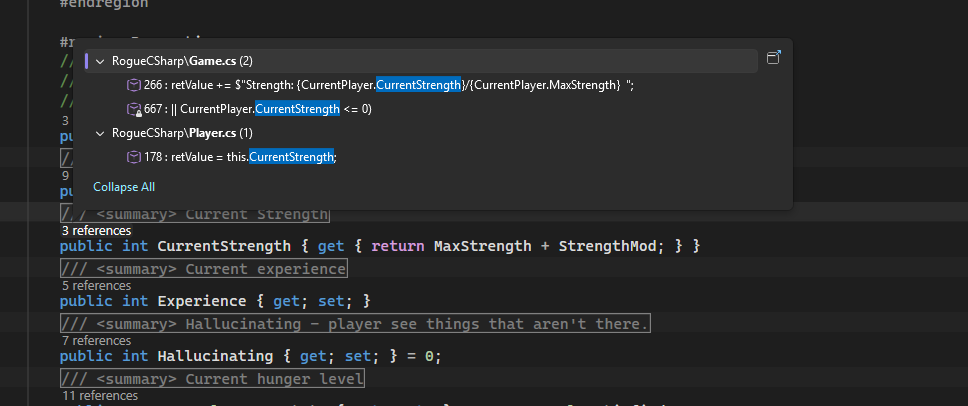
The obvious one is in the Game.StatsDisplay() function that assembles the player stats for the bottom of the screen.
Game.EvaluatePlayer() also had a reference that tests the player’s strength level to see if it’s down far enough to be lethal. The only remaining reference was the TotalStrength() function itself.
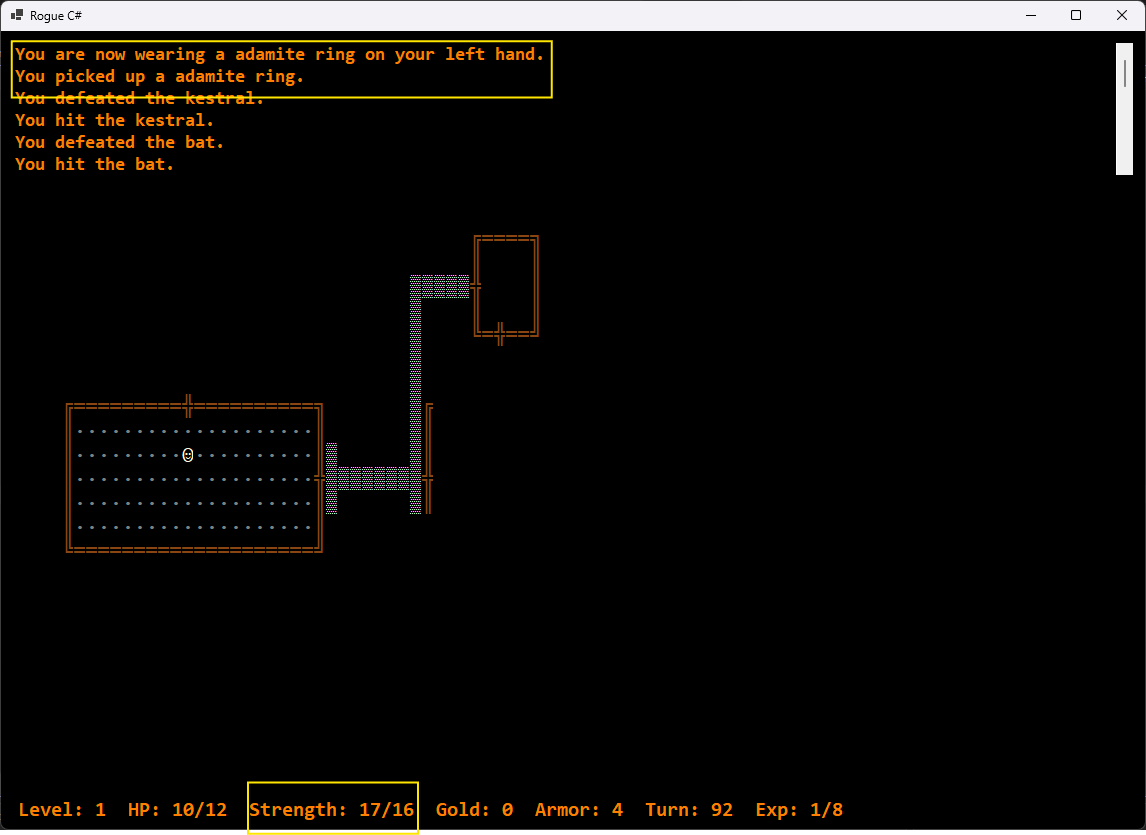
I could do another small function to calculate the max strength with rings and other temporary enhancements, but I’ll probably leave it there and think of it as 106%.
Let’s try coding up the Ring of Searching. This one continuously searches while you move, helping you find hidden doors and other items.
The Game class already has a SearchForHidden() method that’s called when the player hits the ‘s’ key and provides a 20% chance of finding a hidden item if it’s there. Now, we need a Player class function that can determine if the program should automatically call it when the player moves.
/// <summary>
/// If the player has any searching assists,
/// return the degree of assistance.
/// </summary>
/// <returns></returns>
public int AutoSearch()
{
    int retValue = 0;
    // Look for the Ring of Searching on both hands.
    if (this.LeftHand != null &&
        this.LeftHand.PriorityId == RingOfSearching)
        retValue += this.LeftHand.Increment;

    if (this.RightHand != null &&
        this.RightHand.PriorityId == RingOfSearching)
        retValue += this.RightHand.Increment;

    // This ring makes the player hungry faster.
    this.HungerTurn -= retValue;

    return retValue;
}
Just like with the Ring of Add Strength, we need a total increment by which to increase the rate of searching because rings can have varying increments of power. Now we need to call this function from somewhere in the code and there’s really only one place that makes sense – the MovePlayer() method in the Game class.
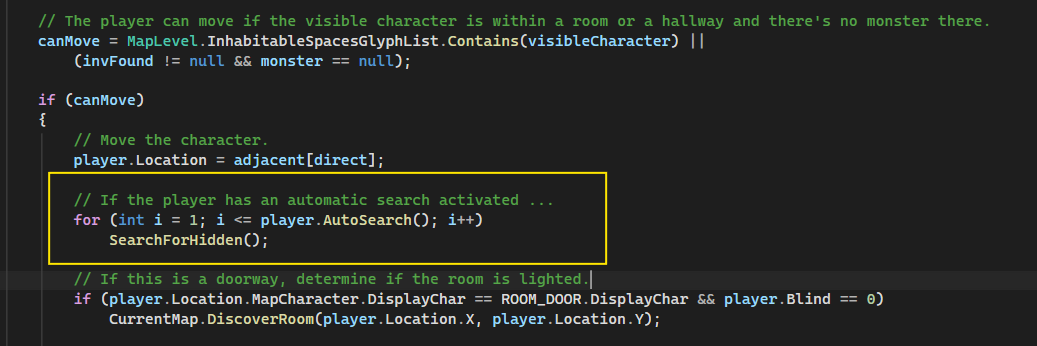
The search method will be called as many times as the ring’s increment property specifies, or the combined increment if the player is wearing two of the rings. This won’t guarantee that something will be found on each move but, as the player moves around, the cumulative effect will be quite an assist, especially if the ring has more than a +1 increment. Of course, with this and other rings, higher increments make the player have to eat more so let’s hope the randomizer isn’t stingy with food and the ring isn’t cursed.
How many carats?
Speaking of increments … right now all the rings are +1 increment and the game doesn’t have a way to increase that. There are no scrolls or potions that affect rings except for Remove Curse which does just what it says. Some variation would be nice. Adding alternate versions of the rings isn’t a great option because of the name and PriorityID properties which would need to be varied and the InvTemplateID enumeration that would need to hold more members. There’s another way.
When the player steps on an inventory item, the MovePlayer() method calls the Game.AddInventory() function which then calls Inventory.GetInventoryItem(), if the item will fit in the player’s inventory. This function clones the necessary template which is a great place to play around with the properties a bit.
/// <summary>
/// Get a specific inventory item by name from the list of templates.
/// </summary>
/// <param name="ItemName">Real name of item.</param>
/// <returns></returns>
public Inventory? GetInventoryItem(string ItemName)
{
    Inventory? retInv = null;

    List<Inventory> retList = (from Inventory item in InventoryItems
                where item.RealName == ItemName
                select item).ToList();

    // Clone a new object from template and make some adjustments.
    if (retList.Count > 0) {
        retInv = new Inventory(retList[0]);
        InventoryVariation(retInv);
    }

    return retInv;
}
/// <summary>
/// Introduces random variations into inventory items.
/// </summary>
/// <param name="item"></param>
public void InventoryVariation(Inventory item)
{
    item.IsCursed = (!item.IsProtected && rand.Next(1, 101) > ITEM_CURSE_PROB);

    switch (item.ItemCategory)
    {
        case InvCategory.Ring:
            item.Increment = item.IsCursed ? rand.Next(1, 6) : rand.Next(-5, 0);
            break;
    }
}
The new ItemVariation() method will be expanded to handle other inventory categories but, for now, it randomly determines if the item is cursed and then sets the increment between 1 and 5 if it isn’t and between -5 and -1 if it is. This setting of IsCursed will, of course, replace the setting that I added earlier when the player puts an item into use. It’s better to have it here, one time, than inconsistently between types, even if it has no effect on some items. Maybe it makes food taste awful or gives the player really bad gas.
When I tested this one, it worked great the first time except that it was a +4 ring of Searching and the player was not getting hungry even though the ring had adjusted the turn number for hunger down to turn number -8551. Then I found this in the EvaluatePlayer() method.
// If the player's scheduled to get hungry on the current turn, update the properties.
if (CurrentPlayer.HungerTurn == CurrentTurn)
{
    CurrentPlayer.HungerState = (CurrentPlayer.HungerState > 0)
        ? --CurrentPlayer.HungerState : 0;
...
The HungerTurn setting skipped right over the CurrentTurn when the ring changed it so they were never equal and it never activated. This is a simple fix of an operator to <=. It’s just a reminder of why testing is important and I anticipate quite a bit of it as I add more ring functions.