In this chapter … I flowchart the interaction of classes in the code to look for any issues and review how classes are used in object-oriented programming. Read more of the Rogue C# series here.

From the original explorer’s notes –
“One of the purposes of Object Oriented Programming is to separate the program logic from the user interface so they are not dependent on each other and to better organize the code. We could throw all the game logic on the Windows form itself but then we would be trying to track down errors in the game amidst code for buttons and other controls. Also, what if we want to give the game an entirely different interface for more advanced graphics? Having a system of classes that’s separate from the interface makes those things a lot easier.”
That still sums up a lot of reasons for using object oriented programming (OOP) for me – a place for everything and everything in its place. Keeping things organized makes the application easier to support later. Not everybody agrees on this; some people prefer other types like procedural or functional programming and the debate can get a little heated.
I personally started out with procedural programming way back when with my first introduction to BASIC. Years later, I moved to VBA which is event-driven programming that allows for some object-orientation but doesn’t encourage it. Depending on how you use it, it can be procedural, focusing on step-by-step instructions and loops, or functional with user-defined functions. It just lets you do whatever the heck you want which, in the wrong hands, is often not a great plan.
I learned OOP when I had to for a job I’d taken. It came pretty easy and became my new standard, with the occasional look back at VBA for fun and profit.
Getting back to business
It’s been a busy week for me so I’ve been distracted from this rescue project but I’m committed (or should be) and will continue. One of the things I worked on was signing up for Substack where I’ll be sharing future content and hopefully gaining more readers. If you enjoy this work and would like to be notified when a new article drops, you’re welcome to subscribe for FREE on Substack so you can get an e-mail notification and I can know that one more person has truly found these articles helpful.
After getting the mapping process in order, the next step in the first phase of this project was to start building the system of classes for the application, including classes for the player, inventory and monsters. I decided a review of those classes was in order and, once again, I decided to view it from above by putting together a flowchart.
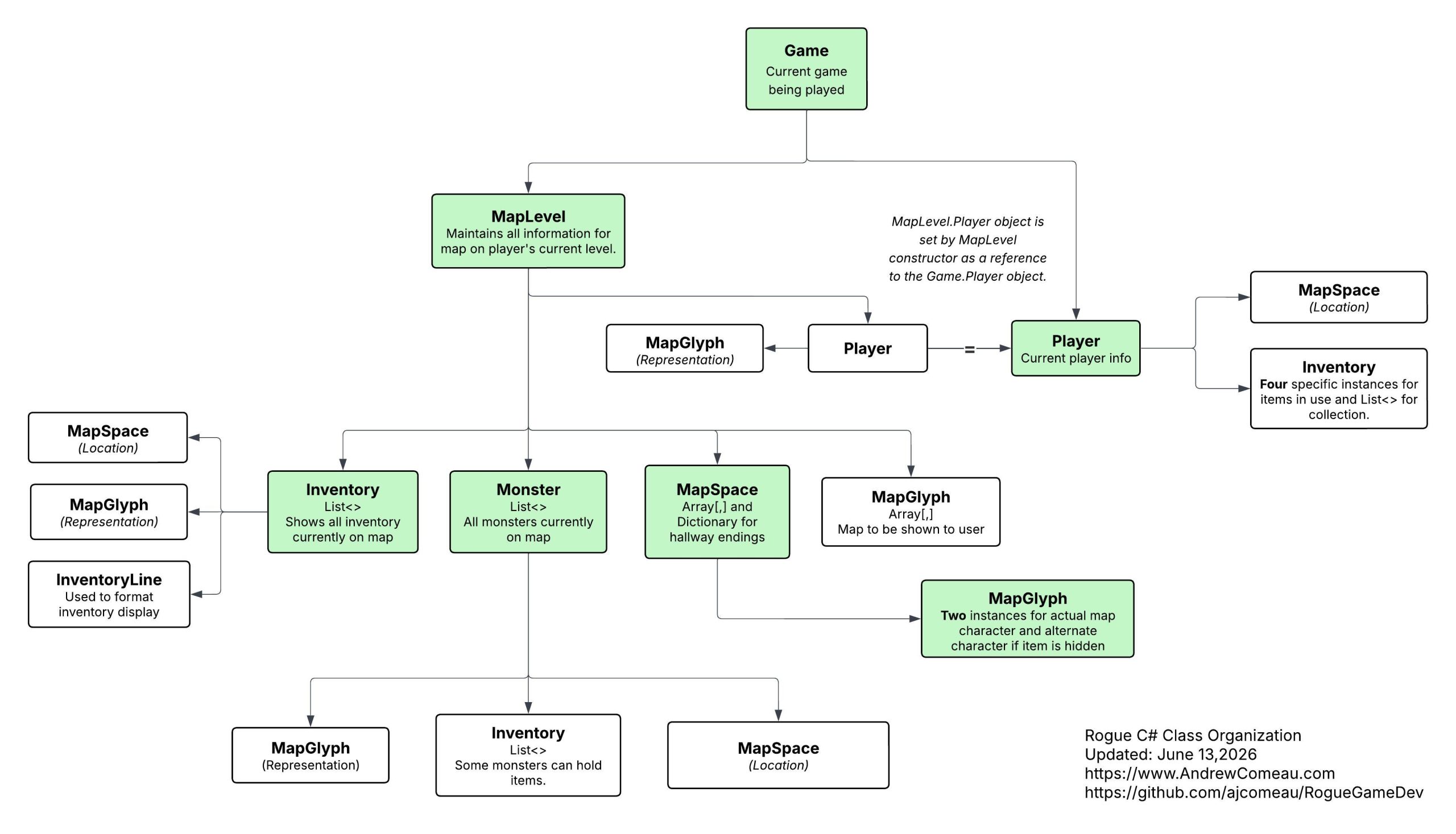
These are the actual instances of the classes in the application, the objects created from the classes. The class instances shown in green show the actual list of classes in the application but these classes interact in different ways with multiple classes maintaining instances of the Inventory and MapSpace classes, for example. This allows data to be accessed and passed as needed while keeping it and the necessary functions encapsulated within the proper classes for organization and access control.
The first example that I questioned during my review was the two instances of the Player class – one in the Game class and the other MapLevel class. As the chart mentions, the MapLevel instance is immediately set to point to the Player object created from the Game class.
/// <summary>
/// Constructor - generate a new map for this level.
/// </summary>
public MapLevel(int levelNumber, Player currentPlayer)
{
    CurrentLevel = levelNumber;
    this.CurrentPlayer = currentPlayer;
    do
    {
        MapGeneration();
    } while (!VerifyMap());
}
There are a number of places throughout the MapLevel class where the player’s current location is needed to calculate their interaction with monsters or items on the map. It doesn’t need access to the entire Game object, just a live version of the Player object, so I have the Game class pass the Player object when it creates a map for a new level.
this.CurrentPlayer = new Player(PlayerName);
// Initialize inventory with code names
InitializeInventory();
// Generate the new map, add player and shroud the map.
this.CurrentMap = new MapLevel(CurrentLevel, CurrentPlayer);
Because CurrentPlayer is a reference type based on a user-defined class, only a reference to the object is actually passed to the MapLevel class which can then access the original object and even update it if necessary. It can always see the current player’s position as it’s updated elsewhere in the program. The CurrentLevel value, on the other hand, is an Int value type which is passed ByValue, meaning that a copy of the variable is passed independently of the original.
C# Corner – Value Types vs. Reference Types
So, MapLevel gets just the access it needs without exposing a lot of other Game information, possibly giving it chance to create a tangled mess of dependencies on other parts of the program. Of course, it’s up to the developer(s) to maintain these limits and understand their benefits.
The only other issue I noticed was that the Monster class was maintaining two instances of MapSpace, one for the monster’s current location and one for its destination when moving. I wondered why since the Player class had no need to do that. Then I noticed there were zero references to the Destination property. Either it was a property I’d never put to use or it was obsolete from changes. I went ahead and removed the property.
A second set of eyes
Other than those two things, everything else looked good which was no surprise since I designed the system – of course I would like it. So, I decided to export the flowchart to JPEG and toss it to ChatGPT.
In less than a second it came back with …
Me: What are your thoughts on this class structure?
ChatGPT:
Looking at your diagram, I think the overall direction is solid: you are separating game state, level state, entities, and representations rather than putting everything into one giantGameclass. The fact that you intentionally passedPlayerintoMapLevelinstead of passingGameis a good architectural instinct.A few observations:
Seriously, it was an instant reply and full analysis of the flowchart … almost … as if … it had already seen it … and was just waiting for me to ask. Hmmmm …
… nahhhhh.
The conversation from there can be pretty much summed up as:
ChatGPT: I like A, B and C. Well done. I’d suggest D, E and F.
Me: Thanks. I did those other things because of X, Y and Z.
ChatGPT: Oh, well, that makes more sense. How about this, then?
Me: Here are the previous articles documenting that. (links)
ChatGPT: Wow, that clarifies everything. Forget my suggestions, this is great! How about this minor tweak?
Me: That sounds good. Thanks.
Not to be ungrateful for the ego boost but I might need to check out Claude before my head gets too big.
The minor tweak that it suggested was to make the public MapLevel.Player instance a read-only property which would prevent it from being accidentally set to a new instance from somewhere else, not that I would be silly enough to do that.
/// <summary>
/// Reference to current player to get location and anything else needed.
/// </summary>
public Player CurrentPlayer { get; }
This still allows the constructor to set the instance to the reference passed in.
Remember that the code and documentation for this series, including this newest flowchart, is available on Github.