Ironically, adding the remaining traps to my roguelike game did not break anything new in the code like the potions did; I was able to build on existing resources already in the classes. Also, this week, I did some code reorganization, clearing the deck for the addition of monster special attacks and upcoming inventory additions. In the process, I examine some of the challenges of maintaining separation of concerns within an object-oriented program and opportunities for creative solutions.
This post is part of a series on creating a roguelike game in C#. For the latest chapters and more information, please visit the Official Project Page on AndrewComeau.com. The current code for this project is also available on Github.
Don’t miss the next chapter! Subscribe for free on Substack to be notified when new chapters are posted.
Setting more traps
I went back and finished adding the traps to the game. Many of them duplicate the effects of existing scrolls and potions so there weren’t any changes to make to the codebase other than the actual trap methods.
- A trap door to the next level
- A bear trap that holds the player for four turns
- A sleeping gas trap that puts the player to sleep for six turns
- An arrow trap
- A poison dart trap costing a few hit points and a strength point
- A trap that rusts the player’s armor
- A teleportation trap that sends the player elsewhere on the level
Even though there are only seven traps at this point and their probability for each is 100%, I decided to switch to the weighted probability system I used with inventory in case I want to get more creative later. I took care of this in the Game.SpringTrap() method.
The problem at first was that every time the player hits the same trap, a different trap effect was called. That’s not really bad but it departs from the original game in a way that just looks like a bug.
Adding an Action<Character> property to the MapSpace class costs virtually nothing in resources and solves this. It also expands the capabilities of the class and opens up future possibilities for map spaces that respond when the player hits them.
/// <summary>
/// Action to happen if a character lands on the space
/// </summary>
public Action<Character> LandingAction { get; set; }
Another change to the code in SpringTrap() either searches for an existing delegate in the new property or selects a random one, inserts it into the property and then invokes it. Therefore, if the player steps on the same trap again, the same delegate is invoked.
if (trap.LandingAction != null)
{
    trap.LandingAction.Invoke(character);
}
else
{
    // Randomly search trap delegates
    List<KeyValuePair<Action<Character>, int>> trapList =
        (from KeyValuePair<Action<Character>, int> trapItem in Traps
         select trapItem).OrderBy(x => Random.Shared.Next()).ToList();

    // Get a sum of the probability weights and a random number within that limit.
    trapProbabilityTotal = rand.Next(trapList.Sum(item => item.Value));

    // Iterate through the list, subtracting weights from
    // the random number until we get to 0. Return that item.
    foreach (KeyValuePair<Action<Character>, int> trapItem in trapList)
    {
        trapProbabilityTotal -= trapItem.Value;

        if (trapProbabilityTotal < 0)
        {
            trap.LandingAction = trapItem.Key;
            trapItem.Key.Invoke(character);
            break;
        }
    }
}
Assorted changes
I found out that the recent addition of the OccupiedSpaces() function to the MapLevel class duplicated the existing CurrentMapItems() function which included the player but wasn’t used by anything. The codebase is getting large enough that this kind of thing is starting to happen. I got rid of CurrentMapItems() and added a boolean option to OccupiedSpaces() to include the player if needed.
The Game class was also getting a little bloated and I want to keep it maintainable so I started by creating a new class called GameTools() that can hold static functions and constants not dependent on other game classes.
public static class GameToolsAfter moving many of the constants that affect gameplay over to the new class, such the amount of inventory and number of monsters on the map and healing rate, I added a single line to the top of the other class files to automatically reference the constants in their new location. I also had to switch a number of the constants from private to public.
using static RogueGame.GameTools;This keeps the classes smaller and puts many of the constants in one, easily referenced place.
Now, let’s teach the monsters to fight!
After moving things around for a bit, I started thinking again about how I could implement Monster special powers. If I could avoid putting their delegate methods in the Game class, that would be for the best, especially since there are so many more inventory delegates to add there.
Then I realized that all the delegates I’ve done so far only needed a Character object passed in. The Monster class delegates should be the same. Access to program resources is not the problem.
private void ScrollOfMagicMapping(Character character)

private void ScrollOfEnchantArmor(Character character)

etc..
The primary Monsters template list in the Monster class is static so delegates referenced from it would also have to be static. That’s when I remembered that a static method or function can work on an instance object passed into it. I could have static functions in the Monster class, pass Monster and Character objects to them and store them as delegate references in the Monster template list. The delegate functions can even be Private.
private static string IceMonster(Monster attacker, Character defender, int currentTurn)
{
    bool strike = rand.Next(1, 101) < attacker.SpecialAttackPct;
    string returnMsg = "";

    if (strike && defender is Player)
    {
        defender.Immobile = currentTurn + rand.Next(1, 4);
        returnMsg = "A touch from the Ice Monster freezes your limbs. You can't move ... so cold ...";
    }

    return returnMsg;
}

Then, in the Monsters list ...

new Monster("Ice Monster"   , 1, 8, 2, 120, 3, 12, 50, 0, 0, new MapGlyph('I', Color.LightGray, Color.Black), 50, IceMonster, true, 35, false),
The UpdateStatus() function that updates the status list on the main form was still a problem. That’s called from the Game class and I don’t want to expose it to other classes so the delegates for the Monsters will have to be functions like the one shown above that return a string that can passed back to the Game class so it can update the status message.
if (hitSuccess)
{
    UpdateStatus($"The {Attacker.CharacterName.ToLower()} hit you.", false);

    if (Attacker.SpecialAttack != null)
    {
        statusUpdate = Attacker.SpecialAttack.Invoke(Attacker, Defender, CurrentTurn);
        if(statusUpdate.Length > 0)
            UpdateStatus(statusUpdate, false);
    }
As shown above, I updated the Attack() method overload that handles monster attacks so that, if the monster scores a hit, the code will invoke any special attack delegate that it has.
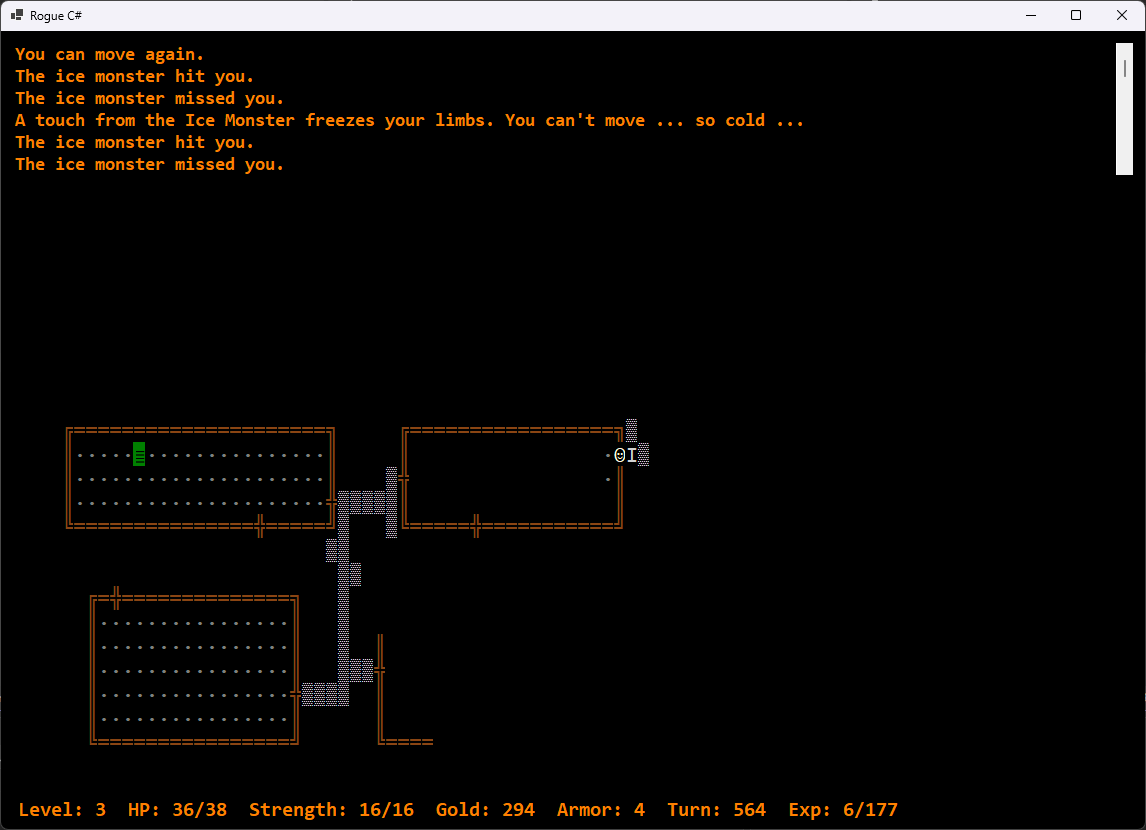
Some monster attacks, such as the Ice Monster or the Medusa, are supposed to hold the player or cause other effects that last a few turns, so I had to pass the CurrentTurn value along with the character but that was the only remaining requirement so it’s not a big deal.
There are a couple of monster attacks that involve the attacker; Leprechauns and Nymphs steal stuff and add it to their own inventory. Originally, I used the Opponent property that provided access to the player’s current attacking monster and its inventory. After running it through a couple of evaluations by Gemini and ChatGPT, I decided to pass the attacking Monster as well as the defending Character. This simplifies the code and maintains the possibility of monsters attacking monsters at some point.
Hit and run
The real problem is that the leprechaun and the nymph are supposed to teleport to another part of the map after they steal the stuff and, while the Monster class does have a MapSpace Location property, it doesn’t have access to the current map object and has no legitimate need for one.
public bool Teleport { get; set; } = false;The cleanest way I thought of to handle this was to add a boolean Teleport property to the Monster class. This property can be set to True by the delegate. The monster’s Game.Attack() method then responds by using its access to the current map to give the monster a quick escape, setting the Teleport property to False again once that’s done.
if (hitSuccess)
{
    UpdateStatus($"The {Attacker.CharacterName.ToLower()} hit you.", false);

    if (Attacker.SpecialAttack != null)
    {
        statusUpdate = Attacker.SpecialAttack.Invoke(Attacker, Defender, CurrentTurn);
        if(statusUpdate.Length > 0)
            UpdateStatus(statusUpdate, false);
    }

    damage = rand.Next(Attacker.MinAttackDmg, Attacker.MaxAttackDmg + 1);

    // If the monster needs relocation, do that now.
    if (Attacker.Teleport)
    {
        Attacker.Location = CurrentMap.GetOpenSpace(true);
        Attacker.Teleport = false;
    }
}
else UpdateStatus($"The {Attacker.CharacterName.ToLower()} missed you.", false);
The Leprechaun delegate can make good use of this since these little pests like to steal a bunch of gold and then disappear.
private static string Leprechaun(Monster attacker, Character defender, int currentTurn)
{
    bool strike = rand.Next(1, 101) < attacker.SpecialAttackPct;
    string returnMsg = "";
    int tax = 0;
    Player player;

    if (strike && defender is Player)
    {
        player = (Player)defender;

        // Take up to 25% of the player's gold and transfer it
        // to the Leprechaun.

        if(player.Opponent != null && player.Gold > 4 &&
            player.Opponent.DisplayCharacter.DisplayChar == 'L')
        {
            tax = rand.Next(1, (int)(player.Gold * .25) + 1);
            player.Gold -= tax;
            player.Opponent.Gold += tax;
            player.Opponent.Teleport = true;
            returnMsg = "Your purse feels lighter.";
        }
    }

    return returnMsg;

}
As shown here, the delegate itself will need to handle any probabilities of the special attack actually being used that need to be added. The Monster class has a SpecialAttackPct property that can specify how often each monster type should use its ability. The Ice Monster freezes you about half the time while a Leprechaun will almost always steal your gold on the first strike.
“Well, it worked on my dev machine …”
It really is important to test on different machines. I’ve mostly been working with this code on my main development machine, a Windows 11 Pro mini-PC with an Intel N97 processor and 16 GB of RAM which, surprisingly, runs Visual Studio 2026 really well. This afternoon, I decided to switch to my laptop for a while which is slightly less powerful and runs Windows 11 Home. Then, I noticed a weird bug.
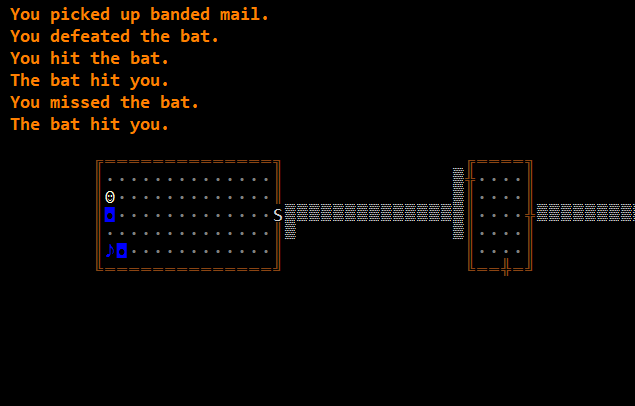
The game was saying that I’d picked up the item but the player hadn’t advanced to the space. I quickly verified that it wasn’t happening on the dev machine, just on the laptop, and groaned at what looked like a tough bug to work out. I wasn’t really feeling up to it at the moment.
So, I called in ChatGPT just to see what it could do. I gave it the screenshot and described the problem.
“This is a tricky bug in my C# roguelike. In the attached screenshot, you can see that the message at the top is saying the player has picked up the item even though the player character has not moved onto the space where the item exists. This is happening on one machine but not the development machine.”
I forgot to include the address of the Github repository before hitting enter so it suggested a few things that were reasonable but wrong.
- Pickup check uses the wrong coordinates
- You’re checking the attempted destination, but movement failed
- The item is being removed independently of the displayed map
- Different build/runtime or stale binary on the other machine
“Can you analyze based on the repository at ajcomeau/RogueGameDev?”
ChatGPT:
“Yes. After tracing the current repository, I think I found a very strong explanation that matches both the screenshot and the fact that it only happens on one machine.
“My main conclusion: the game state is probably correct; the screen is one repaint behind
“The key problem is in DungeonMain_KeyDown():“
Sure enough, that was it. I send an Invalidate command to the main form on every key press to allow for updates. In one of the recent code changes, I moved the Invalidate before the key handling for some reason. My dev machine didn’t process the refresh until after the key handling code but the less powerful laptop handled it immediately, so the refresh happened before the character moved instead of after. Simply moving the invalidate command to after the key handling code fixed the problem.
// Don't send keys until the game has been instantiated
// and then don't send CTRL / SHIFT / ALT.
if (e.KeyValue > 18)
{
    e.SuppressKeyPress = true;
    currentGame.KeyHandler(e.KeyValue, e.Shift, e.Control);
    lblStats.Text = currentGame.StatsDisplay();
    listStatus.SelectedIndex = 0;
    listStatus.SelectedIndex = -1;
}
// Invalidate to redraw map.
this.Invalidate(true);
I believe that debugging skills are at least as important as coding skills and I didn’t feel great about calling on ChatGPT for this but I have to say that I’m very impressed that a general LLM can be this flexible in referencing and analyzing resources.
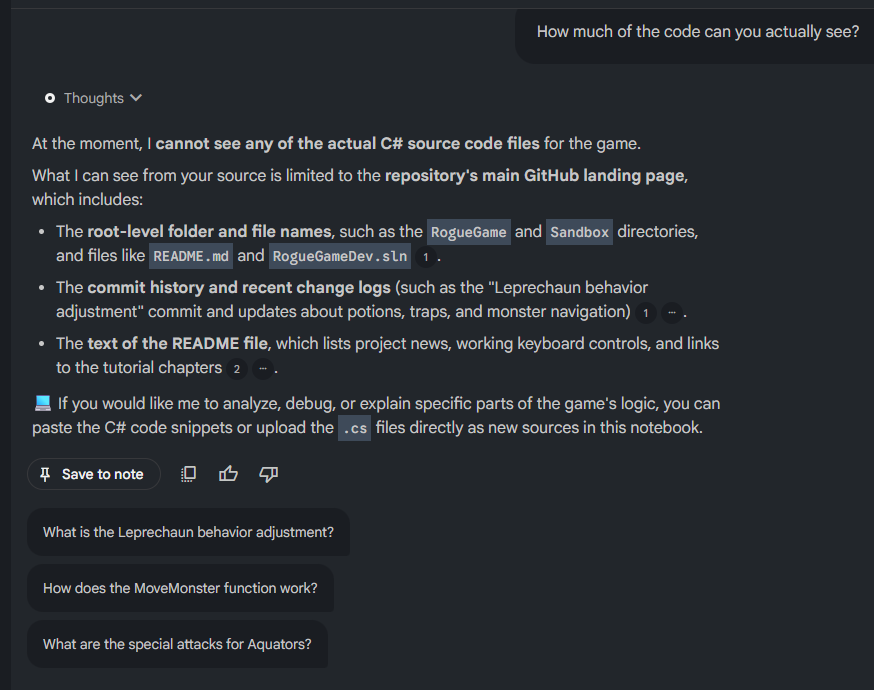
It would be great if NotebookLM could also fully analyze Github repositories. I’ve been using a notebook to hold this entire series so I can quickly research past changes. I added the repository link and it was able to reconstruct a lot from the surface details of the repository and other sources. When I made it focus specific on the repository, however …
Then, there’s inventory …
I have to do some more thinking on inventory handling in light of my solution for the Monster special attacks. I still need to implement rings, staves and wands, 29 new items in all, and it would be awesome if I could put those in the Inventory class instead of the Game class. Now that I have some experience coding inventory items, I can do a real review of their access requirements and maybe start putting them where they belong, even if I have to split the inventory up by category.