This week, I decided to switch back to adding inventory to the game – this time, potions. Potions are the same in principle as scrolls but each new effect does potentially require supporting changes elsewhere, including new properties and changes in game play and combat. I also took care of some bug fixes and minor irritations.

This post is part of a series on creating a roguelike game in C#. For the latest chapters and more information, please visit the Official Project Page on AndrewComeau.com. The current code for this project is also available on Github.
Don’t miss the next chapter! Subscribe for free on Substack to be notified when new chapters are posted.
Recent changes
Just because you say it’s True …
In preparation for adding potions, I refactored the inventory effect system for scrolls and potions to use Actions instead of Func in the delegate for cleaner code. Boolean functions were returning meaningless True values just on the chance that one might be needed.
The Player.InventoryEffect delegate property also changed to an Action instead of Func for same reason.
Ding-a-ling
The Windows ding sound was starting to get on my nerves and it would sound more and more as the game progressed, especially when using CTRL actions and searching (‘s’). I stopped it by changing the KeyDown event on the main form.
// Don't send keys until the game has been instantiated
// and then don't send CTRL / SHIFT / ALT.
if (e.KeyValue > 18)
{
    e.SuppressKeyPress = true;
    currentGame.KeyHandler(e.KeyValue, e.Shift, e.Control);
...
Clearing old messages
In the original Rogue, only one message appeared at the top of the screen at a time. I opted for scrolling messages in a BindingList that attaches to the ListBox on the form but there are some messages that really should disappear when another one comes up, like “Please select an item to read.”.
I finally came up with a simple solution; start the temporary messages with a space character and then …
private void UpdateStatus(string Status, bool Confirm)
{
    // If the last message started with a space, it was temporary so remove it.
    if(StatusList.Count > 0 && StatusList[0].ToString().StartsWith(' '))
        StatusList.RemoveAt(0);

    // Add new message.
    if (Confirm)
    {
        StatusList.Insert(0, Status);
        MessageBox.Show(Status);
    }
    else StatusList.Insert(0, Status);
}
Eventually, I want to get rid of that message box, too. Right now, it’s only being used if the player faints but it still take the user out of the original Rogue experience.
Getting down to business
This week, I decided to add all the potions to the game but first, I reconsidered the Dictionary holding delegate connections from the Game class.
InventoryActions = new Dictionary<(InvCategory InvCat, string InvName), Action>
{
{(InvCategory.Scroll, "Identify"), ScrollOfIdentifyBegin},
{(InvCategory.Scroll, "Magic Mapping"), ScrollOfMagicMapping},
{(InvCategory.Scroll, "Enchant Armor"), ScrollOfEnchantArmor},
I really didn’t like this; magic strings are as bad as magic numbers. All it takes is a typo in the item name and it won’t match it up to an actual inventory item. It’s already happened during testing. There was also no hard link between this Dictionary and the InventoryItems list or anything to remind a developer of the need to keep both in sync, beyond the comments that is.
Members of an enumeration would be better and, as I looked at it, I realized they would solve another issue, too.
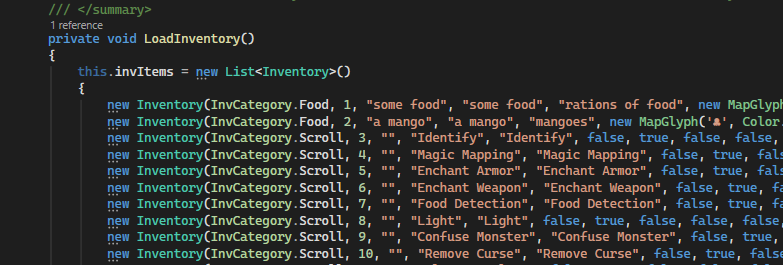
That sequential priority ID has been a nuisance. It keeps the inventory list in order so I’ve had to keep renumbering the list as I’ve added inventory items. Of course, I’ll have to do that with an enumeration, too, but at least the number will be assigned some extra meaning.
The first step is to create the enumeration.
public enum InvTemplateID
{
TheAmulet = 0,

// Food
SomeFood = 1,
Mango = 2,

// Scrolls
ScrollOfIdentify = 3,
ScrollOfMagicMapping = 4,
ScrollOfEnchantArmor = 5,
ScrollOfEnchantWeapon = 6,
....
It’s a long enumeration but I have the room. I put the Amulet at the top as item 0. It really should go at the top of the player’s inventory list when they get it.
Then, I changed the type of the Inventory.PriorityID property. The compile time errors that generates will guide me to the rest of the needed changes.
        /// <summary>
        /// Unique ID used for ordering.
        /// </summary>
        public InventoryTemplateID PriorityId { get; set; }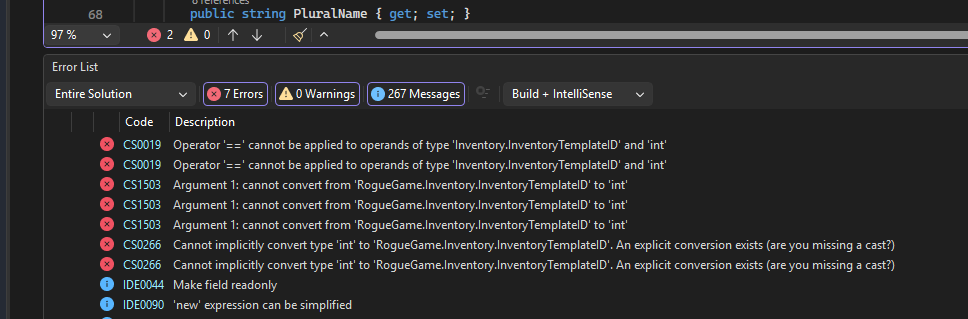
That error list grew significantly when I changed the type in the constructors and the inventory template list suddenly realized something was wrong, so I had to bring it into the loop.
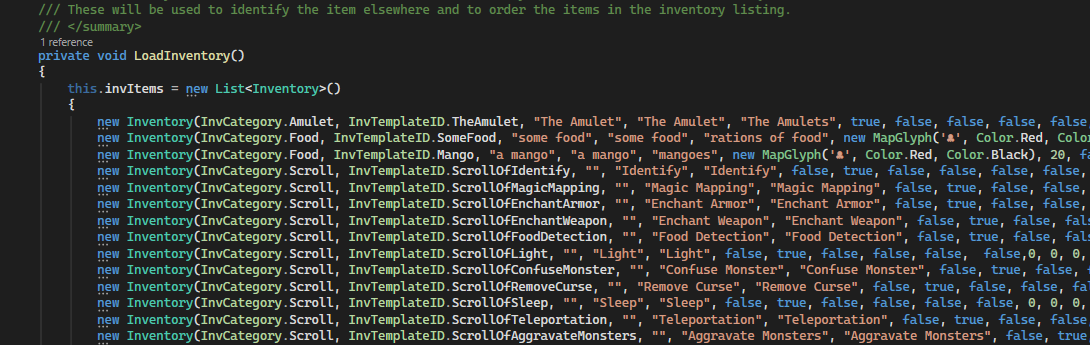
Do I still need that InvCategory enumeration now that I’m specifically identifying the item? That’s right … I’m searching inventory by category in at least one point in the game, so I’ll keep it around for now.
Then, I moved to the Game class to break some more code references by changing the declaration for the InventoryActions dictionary. We no longer need a tuple to identify a specific template.
/// <summary>
/// Searchable dictionary field to hold delegates for inventory items.
/// </summary>
private Dictionary<InvTemplateID, Action> InventoryActions;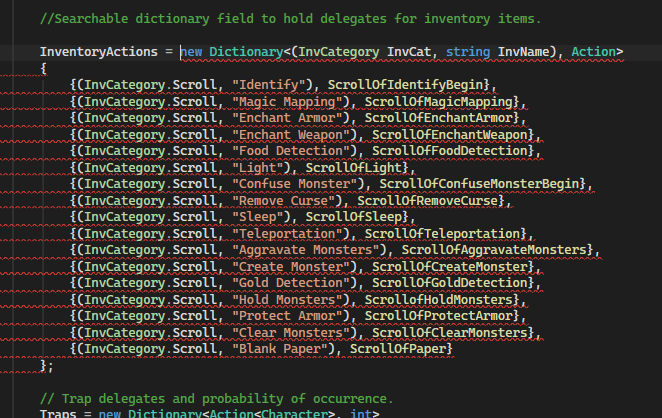
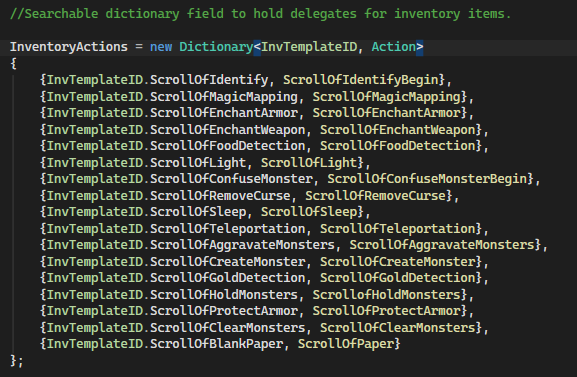
Of course, that brings us back to the question of why I don’t just define these delegate procedures as an Inventory class property. First, they’re only needed for a subset of the inventory items which might be okay except that all the delegate methods need to be in the Game class where they have all sorts of wonderful access to Player and Monster properties and other aspects of the current game.
Also, calling them from the Inventory class would require that class to have a reference to the current game instance which would mess up the class hierarchy.
Since all the delegates are named the same as the enumeration members, I could get rid of the InventoryActions dictionary and do something like this in ReadScroll() and QuaffPotion(), just looking for a method that matches the name of the enumeration member.
MethodInfo? method  = typeof(Game).GetMethod(items[0].PriorityId.ToString());
if (method != null)
    method.Invoke(this, null);
I might actually try this but, for now, I like the explicit and visible wiring of the Dictionary and the flexibility it allows.
Finally, the ReadScroll() and QuaffPotion() functions needed to be updated.
// Find and invoke the delegate
if (InventoryActions.TryGetValue(items[0].PriorityId, out var taskInfo))
{
    // Remove the item from the player's inventory and invoke delegate.
    CurrentPlayer.CharacterInventory.Remove(items[0]);
    taskInfo.Invoke();
}
But, does it work …?
Running the program, everything looks good so far. The scrolls work as they should and show up right in inventory, although I did notice that picking up a scroll type that’s already been identified shows the code name in the status update so that’s something to fix.
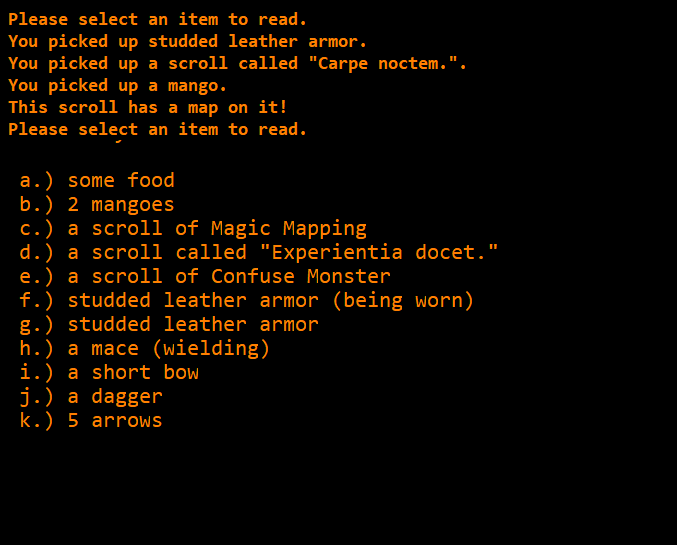
After playing for a bit, I noticed that the identified items would get the correct name on the next map level. I realized that the method for identifying an item that’s been used wasn’t updating the current map’s inventory, just the templates and the player’s collection.
public void SetInventoryAsIdentified(InvTemplateID PriorityID)
{
    Inventory? template = GameInventory.InventoryItems.FirstOrDefault(x => x.PriorityId == PriorityID);

    // Set the inventory template as identified
    if (template != null) template.IsIdentified = true;

    // Set all instances in the player's inventory as identified.
    foreach (Inventory item in CurrentPlayer.CharacterInventory)
    {
        if (item.PriorityId == PriorityID)
            item.IsIdentified = true;
    }

    // Take care of any remaining instances on the map.
    foreach (Inventory item in CurrentMap.MapInventory)
    {
        if (item.PriorityId == PriorityID)
            item.IsIdentified = true;
    }
}
Then, after creating the new templates and assigning them PriorityIDs, I linked them to new delegates in the Game class.
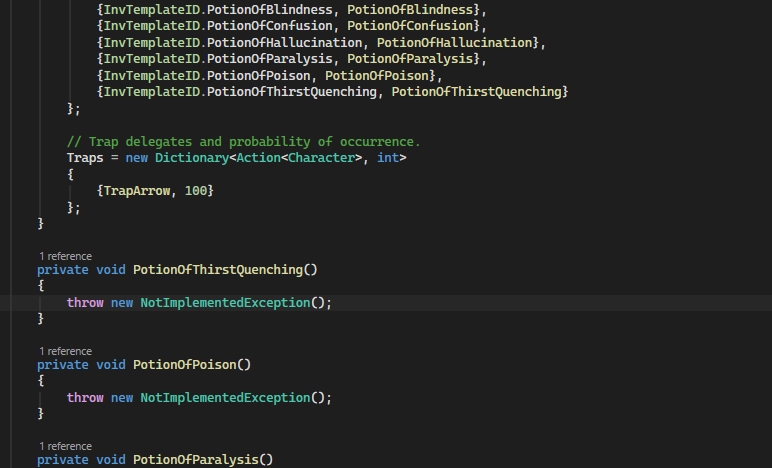
Of course, these delegates now need to be coded with something so they’re not throwing all those NotImplementedExceptions. Just for the fun of it, I decided to add a bit of error handling to QuaffPotion() and ReadScroll(), in case I miss one.
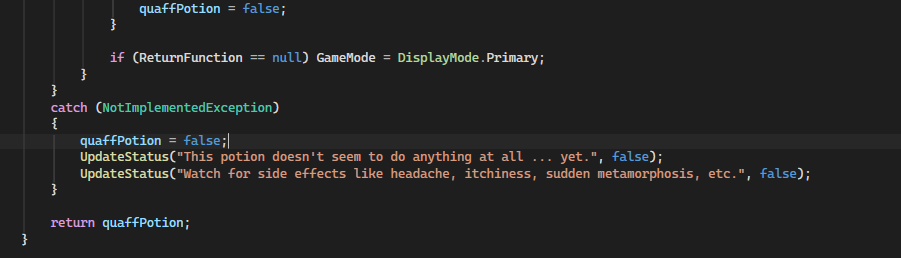
Well, at least it keeps the program from crashing and offers a bit of entertainment.
Formulating the potions
I won’t detail all the potions here; some of them were quite simple. There were a few that required the code to adapt in new an interesting ways.
Potion of Raise Level
One of my early decisions to encode the threshold for the next experience level as a Player class property came in handy here.
/// <summary>
/// Raise the player to the next experience level by increasing
/// their hit points.
/// </summary>
private void PotionOfRaiseLevel(Character character)
{
    if (character is Player)
        CurrentPlayer.Experience = CurrentPlayer.NextExpLevelUp + 1;

    UpdateStatus($"Welcome to Level {CurrentPlayer.ExpLevel + 1}.", false);
}
Monsters don’t have experience levels so hitting a monster with this one shouldn’t do anything but that could change if I want to make things more challenging. Once the player’s actual experience is increased, the Game.EvaluatePlayer method should take care of the rest.
// Check for experience level increase.
if (CurrentPlayer.Experience >= CurrentPlayer.NextExpLevelUp)
{
    CurrentPlayer.NextExpLevelUp *= 2;
    CurrentPlayer.ExpLevel += 1;
...
Potions of Healing
According to my sources, the potion of healing adds up to four hit points multiplied by the experience level of the player, raises the max HP by one if there’s no current damage and cures blindness, confusion and hallucination. the potion of extra healing does the same, just at double-strength. I didn’t have a hallucination property for the player but I guess I need one now. It can work the same as the Confused and Immobile properties by defining the turn number at which it should expire.
I thought about just making the player confused but that’s the easy way out. I’ll leave that for the monsters – they probably don’t have the same appreciation for trippy colors and stuff coming out of the walls, anyway.
/// <summary>
/// Hallucinating - player see things that aren't there.
/// </summary>
public int Hallucinating { get; set; } = 0;
Since these two potions are doing the same thing at different intensities, there’s no need to duplicate the code so the Player class gets a new method.
/// <summary>
/// Heal the player by the specified number of hit points.
/// </summary>
/// <param name="healingPoints">The number of hitpoints of healing to give the player.</param>
/// <param name="expTurn">The new expiration turn for blindness, confusion and hallucination.</param>
public void Healing(int healingPoints, int expTurn)
{
    if (this.HPDamage == 0)
        this.MaxHP += 1;

    this.HPDamage = (healingPoints > this.HPDamage) ? 0 :
        this.HPDamage - healingPoints;

    // For blindness, confusion and hallucination, set any remaining time to one
    // less than the current turn to let EvaluatePlayer() display
    // the appropriate messages.
    if (this.Blind > 0)
        this.Blind = expTurn;

    if (this.Confused > 0)
        this.Confused = expTurn;

    if (this.Hallucinating > 0)
        this.Hallucinating = expTurn;
}
Then each potion can call it after it decides how many hit points to regenerate the player.
private void PotionOfHealing(Character character)
{
    int healing = CurrentPlayer.ExpLevel * rand.Next(1, 5);

    if (character is Player)
    {
        CurrentPlayer.Healing(healing, CurrentTurn - 1);
        UpdateStatus("You feel better now.", false);
    }
    else
    {
        character.HPDamage -= healing;
        character.Blind = 0;
        character.Confused = 0;
        UpdateStatus("The monster looks healthier now. - 'Gee, thanks! I'll try to make this quick.'", false);
    }
}

private void PotionOfExtraHealing(Character character)
{
    if (character is Player)
    {
        int healing = CurrentPlayer.ExpLevel * rand.Next(1, 9);
        CurrentPlayer.Healing(healing, CurrentTurn - 1);
        UpdateStatus("Oh, that feels MUCH better ...", false);
    }
    else
    {
        character.HPDamage = 0;
        character.Blind = 0;
        character.Confused = 0;
        UpdateStatus("That might have been a mistake. The monster suddenly looks much healthier.", false);
    }

}
If you’re hitting a monster with a potion. Make sure you use the right one.
Potion of Monster Detection
This potion detects all monsters on the map and that detection has to last at least a few turns, even though they refuse to stay still. Map spaces have a RemoteSight property so I can easily activate that for any monster on the map, but I don’t want them leaving visible trails on the map.
The first step was to create a new MapLevel method called ClearRemoteSpaces() and call it from the beginning of the MapText() function which assembles the map the user will see.
/// <summary>
/// Turn off remote sight for any spaces that no longer contain anything relevant.
/// </summary>
public void ClearRemoteSpaces()
{
    List<MapSpace> remotes = (from MapSpace space in levelMap
                              where space.RemoteSight = true
                              && (InhabitableSpacesGlyphList.Contains(PriorityChar(space, false).DisplayChar))
                              select space).ToList();

    remotes.ForEach(remote => { remote.RemoteSight = false; });

In MapText():

// Clear any remote sight spaces that are now empty.
ClearRemoteSpaces();
That should also clear up a problem with a couple of the scrolls which detected food and gold and then left the spaces visible after the user collected the items. I ran the program and saw no lag because of the new method.
The next step is to show all the monsters on the map by turning on the RemoteSight for their location. This goes in the MapLevel class where it might be reusable. I created a similar method for magic items for the potion of magic detection.
public void ShowAllMonsters()
{
    List<Monster> monsters = (from Monster monster in ActiveMonsters
                              select monster).ToList();

    monsters.ForEach(monster => monster.Location!.RemoteSight = true);
}
Of course, that’s only going to last a single turn until those restless monsters move out of the spaces that have been marked so the delegate for this potion will be in two parts and I’ll make another use of the Player.InventoryEffect property.
private void PotionOfMonsterDetection(Character character)
{
    if (character is Player)
    {
        CurrentPlayer.InventoryEffect = (CurrentTurn + 50, PotionOfMonsterDetectionTrack);
        CurrentMap.ShowAllMonsters();
    }
    else
        UpdateStatus("The monster growls at you 'If I fall, my friends will avenge me.'", false);
}
/// <summary>
/// Renew monster visiblity
/// </summary>
private void PotionOfMonsterDetectionTrack()
{
    CurrentMap.ShowAllMonsters();
}
The first method activates the potion effect for 50 turns and points the effect property to the second method which shows all the monster locations during this turn. That means the method has to be invoked at some point in the turn. Fortunately, it’s already being called from EvaluatePlayer() which is called after all the monsters move in the CompleteTurn() method.
// Apply any inventory effects that haven't ended and end those that have.
if (CurrentPlayer.InventoryEffect != null)
{
    if (CurrentPlayer.InventoryEffect?.EndingTurn <= CurrentTurn)
        CurrentPlayer.InventoryEffect?.TargetFunction.Invoke();
    else
        CurrentPlayer.InventoryEffect = null;
}
I introduced the InventoryEffect property for the Scroll of Confuse Monster which was an attack-based scroll. This one grants the player extra vision on the map. So, what happens if the player quaffs this potion right after reading the scroll? Simply, one effect replaces the other – the effects are not stackable. That might have to change at some point which would require a refactor to turn the InventoryEffect property into a List.
It also means that any effects that are to be used during combat must be written so they only happen then. I had to update the ScrollOfConfuseMonster() method to only end the effect if there was an actual opponent.
Potion of Levitation
I’ve never actually seen this one in a game but it’s in the reference so I decided to add it. The Character class gets a new Floating property so that the potion can affect both the player and monsters. According to the sources, the potion is supposed to prevent picking up inventory or using the stairs. I haven’t decided if I want it to affect combat. Either way, it has to be worked into the code at multiple points.
It was actually at this point that I remembered potions are supposed to potentially affect monsters as well as the player so that required a refactor to send a character object to each of these delegates.
/// <summary>
/// Searchable dictionary field to hold delegates for inventory items.
/// </summary>
private Dictionary<InvTemplateID, Action<Character>> InventoryActions;
I’ve never seen anything about the monsters being able to read but scrolls are magical objects so maybe they can have an effect somehow. I started coding the potions to affect monsters as well as the player.
Potion of See Invisible
Different versions of Rogue had invisible creatures that wouldn’t be shown on the map but could deal you some damage. This scroll makes them visible to the player, at least temporarily. I only have the Phantom and I’ve handled its invisibility by coloring its display character black which makes it hard to see but not impossible. There really was no clean way to change this just for a temporary effect by one scroll. The DisplayMap is defined by MapText() in the MapLevel class which would have to be provided with some signal to make that one monster visible.
Invisibility might be a good thing to play around with for both the player and monsters but, right now, it’s just not worth it. I just coded the potion to cure any blindness on the part of the player.
Potion of Haste Self
Bearing in mind that many of these potions should affect the monster if thrown at them, I thought a new RelativeSpeed property for the Character class would be an interesting idea.
/// <summary>
/// Character's relative speed to other characters. Anything above 1.0
/// gives character a chance for an extra move. ExpTurn of 0 is permanent.
/// </summary>
public (int Speed, int ExpTurn) RelativeSpeed { get; set; } = (1, 0);
/// <summary>
/// Make the character (player or monster) faster for 50 turns.
/// </summary>
/// <param name="character"></param>
private void PotionOfHasteSelf(Character character)
{
character.RelativeSpeed = (character.RelativeSpeed.Speed + 1, CurrentTurn + 50);
UpdateStatus("You feel yourself moving much faster.", false);
}I thought this potion would also have to be woven into the code but it really just made me reconsider turn management for way too long. At first, the Speed was a decimal property and I was going to adjust the speed of the player and monsters in fractional increments but that was unnecessarily complicated. After I changed it to an integer, I still had to come up with a way to give either the player or monsters extra actions.
The final result has the monsters potentially acting multiple times during a turn or skipping turns entirely according to a class-level variable that can hold the next turn they’re allowed to move.
At class level:
/// <summary>
/// Property to allow player to take extra turns when sped up.
/// </summary>
private int MonstersNextTurn = 0;

In CompleteTurn():

...
// If the player is sped up, set the next turn for the monsters.
if (MonstersNextTurn == 0 && CurrentPlayer.RelativeSpeed.Speed > 1)
    MonstersNextTurn = CurrentTurn + CurrentPlayer.RelativeSpeed.Speed - 1;

// Perform whatever actions needed to complete turn
// (i.e. monster moves)
if (MonstersNextTurn <= CurrentTurn)
{
    foreach (Monster monster in CurrentMap.ActiveMonsters)
    {
        for(int i = 1; i <= monster.RelativeSpeed.Speed; i++)
            MoveMonster(monster);
    }

    if (MonstersNextTurn > 0) MonstersNextTurn = 0;
}
...
By the time the code has reached this point, the player has already done something and used up a turn. If their speed is 2, for example, the monsters need to skip this turn and resume on the next one, so their next turn is set to the player’s speed minus one.
Monsters will probably never be sped up collectively (although I’m not promising anything) so the next step is to give each monster as many moves within the current turn as its speed allows.
Side effects may include …
Testing is ongoing and I’ll report on any bug fixes in future chapters. Early errors happened when I’d forgotten to add status updates for many of the potions which made it seem like they hadn’t done anything. Then I changed the wrong properties for the Potion of Raise Level and raised the player directly from Level 1 to god mode with one sip of a potion which tends to remove the challenge from the game. Fortunately, with this type of testing, lab monsters are plentiful.