This past weekend, I finally decided to spring for a Chromebook. I’ve been thinking more and more about a Windows replacement machine, at least for basic tasks. I also wanted an inexpensive solution that would extend the life of my current laptop. I often don’t need the full machine out on the road and the smaller profile of the Chromebook makes an attractive alternative.
Helping Users Work With Subforms in Microsoft Access
Creating an Access application for other people means anticipating how the users are going to interact with your program. Without clear direction from the program or you, users can be easily confused by even simple things like the order in which data is to be entered.
One of the basic tools in Access is the subform which allows for the input of records related to a master record. A classic example is a database which stores customer orders and where each order might have multiple items (i.e. order lines) associated with it.
Read More “Helping Users Work With Subforms in Microsoft Access” »
How to Perform a Basic MySQL Installation in Windows
One of the nice features of MySQL as a database software is its noinstall option in which you download the files themselves and perform a manual installation that takes just under a gigabyte of space on your drive. If you’re a developer or a student, this means you can quickly create a new self-contained instance wherever you need it and then blow it away if you need to without cluttering up your registry.
This does mean working on the command line so you’ll want to have a certain comfort level with that. You will also need to be working with Administrative privileges.
Read More “How to Perform a Basic MySQL Installation in Windows” »
How to Programmatically Relink Tables in Microsoft Access / VBA
Several years ago, I designed a Microsoft Access application called JobSearch Plus for managing job leads during an employment search. It was a split application, meaning that the tables were stored in one Access file, the back-end, and everything else was in the front-end file with table links to the other one.
JobSearch Plus was also meant for distribution and I had no idea where any of the users were going to store the files on their computers. Access uses absolute file paths to specify the source database for a linked table. This meant I needed some way to determine if the back-end existed and what it’s file path was.
On it’s own, relinking Access tables in VBA is just a few lines of code.
Dim dbCurr As Database
Dim tdfTableLink As TableDef
For Each tdfTableLink In dbCurr.TableDefs
tdfTableLink.Connect = ";DATABASE=" & (Insert new file path)
tdfTableLink.RefreshLink
Next
This is fine if you know exactly where the new file is but my program could be anywhere on the user’s computer so I had to do some engineering. Also, since this was going out over the Internet to who knows how many strangers with my name on it, it had to work right … always. This is where the fun of actual software development comes in.
Read More “How to Programmatically Relink Tables in Microsoft Access / VBA” »
How To Create a Dynamic Search Filter on a Microsoft Access Form
Best practice when retrieving data in Microsoft Access or any database, for that matter, is to limit the amount of data that you pull at any one time. This means using the proper filters and limiting the number of fields retrieved. Often, you still end up with a lot of information to look through anyway. That’s when it can help to have a dynamic search filter that will enable you to easily search the records with just a few keystrokes.
One easy way to do this is use the form’s Filter and FilterOn properties along with the KeyUp event as shown here.
Read More “How To Create a Dynamic Search Filter on a Microsoft Access Form” »
How to Dynamically Set the Report RecordSource in Microsoft Access
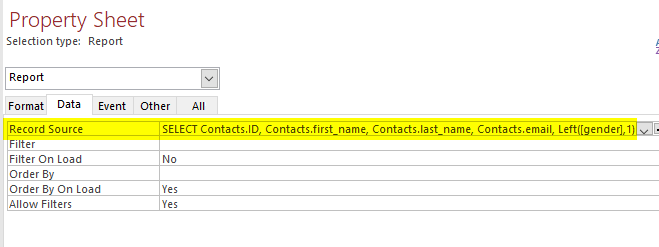
One of the steps for creating a report in Microsoft Access is to define where the data is coming from. This is done through the report’s Record Source property which can be a table or standalone query in the database or a SQL statement as shown in the screenshot below.
Usually, this is defined when the report is created and only gets changed if needed. In some cases, however, you might want to use the same report object for many different queries. You could have a mailing list report that you want to use for employees, customers or other groups at different times and the data would be drawn from different tables or even different databases.
Read More “How to Dynamically Set the Report RecordSource in Microsoft Access” »
How To Create a Local WordPress site with XAMPP
XAMPP is one of many AMP software stacks (Apache – MySQL – PHP) that can be used to create a local web development environment for design and testing. It automatically installs and configures Apache as a web server so that you can view your pages through http://localhost, MySQL as a database server for website data…
Read More “How To Create a Local WordPress site with XAMPP” »
What is Referential Integrity?
One of the fundamental differences between an Excel spreadsheet and a Microsoft Access or SQL Server database is the database’s ability to group data by subject into tables and create links between that information. This type of organization enables the user to store large amounts of data and retrieve specific information quickly by writing queries that will search on the various fields. Referential Integrity is actually a simple but essential concept to understanding how databases like Access or SQL Server work. Once you understand it, you will be able to use these tools to better organize and report on your data.
To demonstrate this concept, I’m going to use a few tables in a Microsoft Access database. Access is a great environment to start learning about databases as it provides a user-friendly interface and is widely available through Office365.
Watch the companion video for this article on YouTube or continue article below …
On Success …
This is my latest Ice Breaker speech that I delivered to the Early Bird Ocala Toastmasters group on November 3, 2018. Toastmasters is a great way to develop your public speaking and leadership skills and there’s probably at least one group in your local area. Check out ToastMasters.org for more information on the club and where you can find it in your area.
What is success?
You can tell a lot about a person by how they answer that and whether they are actually trying to achieve their definition of success. Not everyone defines it personally for themselves.
Custom User Controls and Events in C#
One of the interesting features of C# is the ability to add custom user controls to your forms. If you have some specific functionality centered around a group of form controls that you use repeatedly, you can save it as a custom control in a class library and then add it to other applications. This…