In this chapter … I flowchart the map creation process in this roguelike game to find areas of weakness that can be corrected. In the process, I catch a missing else condition and address the use of constants to replace “magic numbers” in code. Read more of the Rogue C# series here.

This post is part of a series on creating a roguelike game in C#. For the latest chapters and more information, please visit the Official Project Page on AndrewComeau.com. The current code for this project is also available on Github.
Don’t miss the next chapter! Subscribe for free on Substack to be notified when new chapters are posted.
From the original explorer’s notes …
“As we enter this code, keep in mind that it didn’t just spring into existence as fast as I could type it. This method and the hallway generation you’ll see later were the results of a lot of trial and error. The hallway generation algorithm I’ll show you later was not the first approach I tried before finding something that worked. I say this because it’s true of a lot of code that professional programmers write. Workable solutions rarely walk up and introduce themselves; you often have to work them out a piece at a time.”
A review of the Rogue C# code wouldn’t be complete without going over the map generation portion. I’m still satisfied with the way it’s working but it’s been a couple of years and I wanted to check it over to see if any glaring inefficiencies stood out.
The code is well commented and it wasn’t hard to follow even after all this time but I still thought a flowchart of the entire process might be helpful so I turned to LucidChart. My flowchart skills are probably a bit more informal than others but it got the job done.
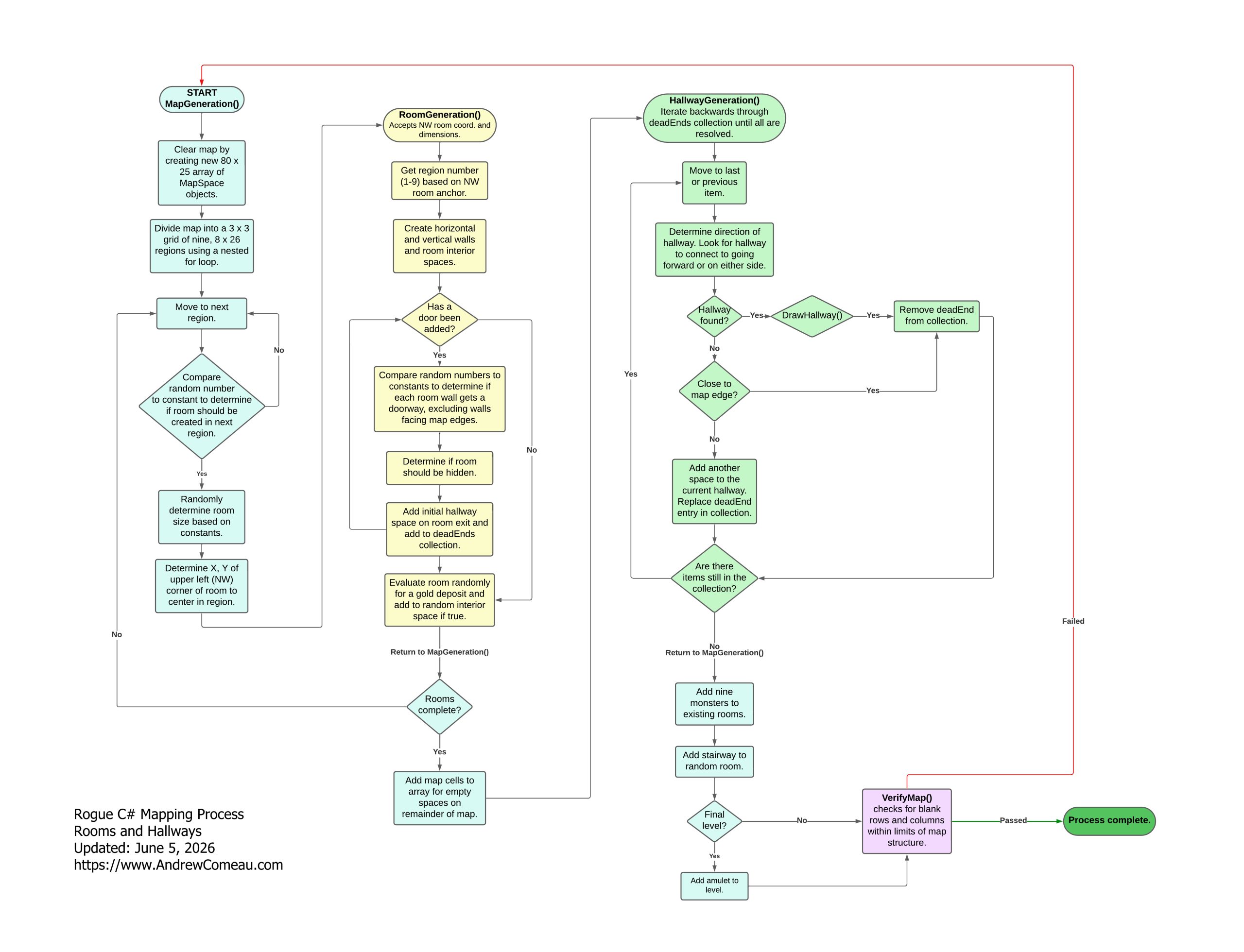
This updated flowchart is also available as part of the project code on Github.
Magic is for potions, not code …
The first item that I noticed was the addition of monsters to the map after the hallways are generated.
“Add nine monsters to existing rooms.”
Or in code –
// Add nine monsters to start, regardless of number of actual rooms.
AddMonsters(9);
For all the constants I’ve used in this program, I would think I’d have used one for this instead of a magic number. That’s the name for a literal value in a program that has no obvious meaning or reason.
Why nine? I guess I was matching the number of regions or potential rooms, neither of which are defined with constants, either. A nested FOR loop calculates the region spaces to plot rooms in and then GetRegionNumber() calculates the current region by the location on the grid. That’s all fine but, when specifying the number of monsters, that should be a constant, if only to enable the game difficulty to be changed easier.
Let’s spice things up …
/// <summary>
/// Maximum number of initial monsters on a level.
/// </summary>
private const int MAX_INIT_MONSTERS = 15;
Then in MapGeneration():
// Add a random number of monsters to start.
AddMonsters(rand.Next(MAX_INIT_MONSTERS));
Now it might be nine … or it could be 12 … or 15.
Enter that dungeon with care.
But, what if the answer is No? …
Then this caught my eye:
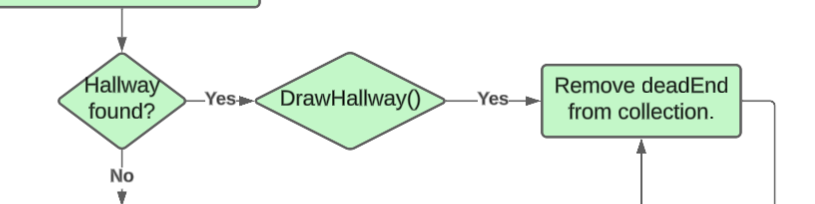
There’s no path for a No result on DrawHallway() which I found out was a boolean function that only returned True. Then the HallwayGeneration() method was doing things like this:
if ((surroundingChars[direction90] != null &&
    surroundingChars[direction90].MapCharacter.DisplayChar == HALLWAY.DisplayChar))
{
    hallwayDug =
        DrawHallway(hallwaySpace, surroundingChars[direction90], direction90);
}
It worked but it was wrong. It was a function that should have been a method and could only return True. It was bad logic. It’s a relatively minor gripe but it’s still bad design.
So DrawHallway() becomes a method and HallwayGeneration() does it properly.
if ((surroundingChars[direction90] != null &&
    surroundingChars[direction90].MapCharacter.DisplayChar == HALLWAY.DisplayChar))
{
    DrawHallway(hallwaySpace, surroundingChars[direction90], direction90);
    hallwayDug = true;
}
We don’t need a second chorus of that …
That lead me to this:
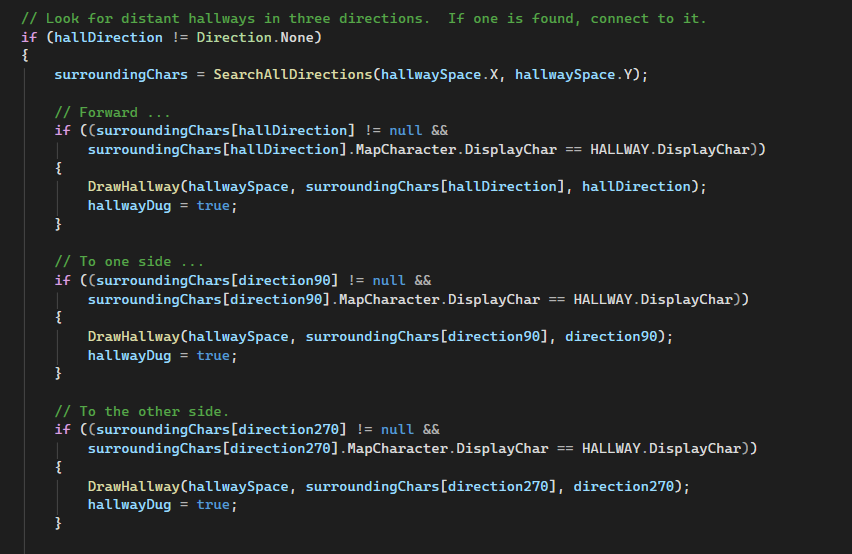
This is the repetitive code in HallwayGeneration() that looks in three directions based on the forward direction of the current hallway. I don’t like repetitive code and I knew there had to be a way to combine these three sections into one. Then it hit me.
Just do a foreach on the direction enumeration and look in all four directions except backwards. I don’t know why I didn’t think of it earlier.
foreach (Direction direct in Enum.GetValues<Direction>())
{
    if (direct != Direction.None && (int)direct != (int)hallDirection * -1)
    {
        if ((surroundingChars[direct] != null &&
            surroundingChars[direct].MapCharacter.DisplayChar == HALLWAY.DisplayChar))
        {
            DrawHallway(hallwaySpace, surroundingChars[direct], direct);
            hallwayDug = true;
        }
    }
}
This will need to be changed eventually if and when I implement diagonal movement and actions but, for now, it works.
In the next part of the method, when the code is unable to draw a hallway, it just inserts another hallway character and it was again using the repetitive code.
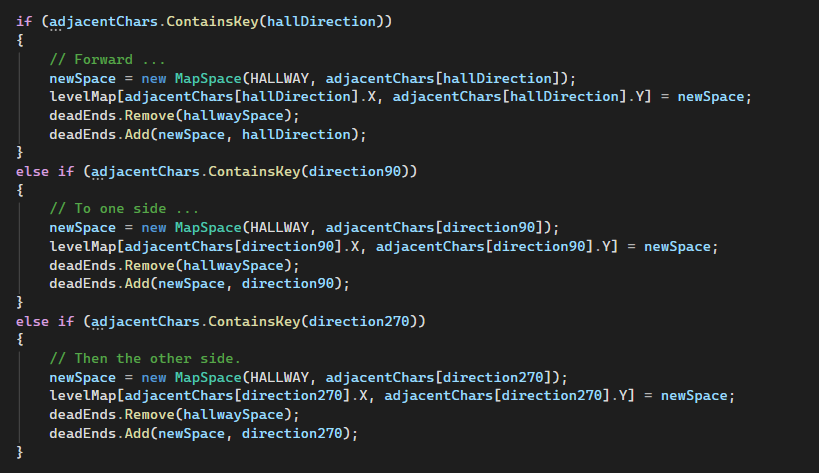
So, I tried the solution again:
foreach (Direction direct in Enum.GetValues<Direction>())
{
    if (direct != Direction.None && (int)direct != (int)hallDirection * -1)
    {
        if (adjacentChars.ContainsKey(direct))
        {
            newSpace = new MapSpace(HALLWAY, adjacentChars[direct]);
            levelMap[adjacentChars[direct].X, adjacentChars[direct].Y] = newSpace;
            deadEnds.Remove(hallwaySpace);
            deadEnds.Add(newSpace, direct);
        }
    }
}
… and got maps like this:
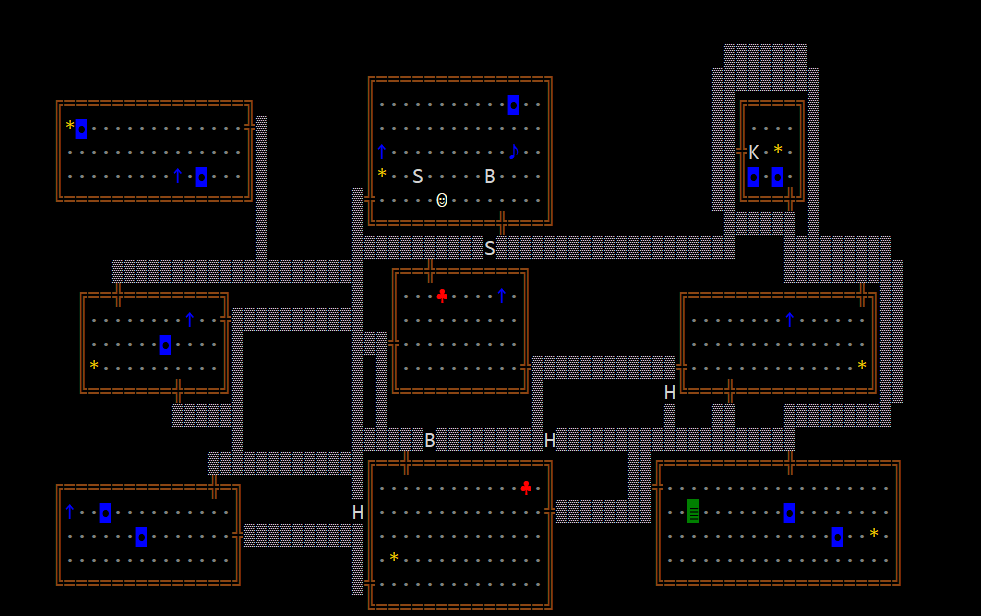
The repetitive code had been prioritizing the forward direction in order to extend the hallways in the same direction they’d been going. This code wasn’t, so I thought that was why it was doubling up hallways all over the place.
The reality was, I probably just needed to break out of the foreach after the first direction was handled. Still, I found a way to change the foreach that simplified things further.
foreach (Direction direct in new List<Direction>{ hallDirection, direction90, direction270})
{
    if (adjacentChars.ContainsKey(direct))
    {
        newSpace = new MapSpace(HALLWAY, adjacentChars[direct]);
        levelMap[adjacentChars[direct].X, adjacentChars[direct].Y] = newSpace;
        deadEnds.Remove(hallwaySpace);
        deadEnds.Add(newSpace, direct);
        break;
    }
}
This eliminates the need to test for Direction.None and the backward direction. I also applied this to the earlier code for drawing hallways and the HallwayGeneration() method became a much shorter procedure.
Well, that was useful …
Flowcharts can inspire as many groans and eyerolls as PowerPoint presentations because it is possible to make them look like the object of the work rather than just one of the tools. They can be a useful tool for visualizing and documenting a process, though, and this little exercise definitely helped improve the code in unexpected ways.
Fortunately, electronic flowchart tools are no longer limited to Visio and other expensive products. I used the free tier of LucidChart for the one you see here which allowed up to 75 shapes on the chart and enabled me to export it to a variety of formats. SmartDraw is another good online tool although its free plan was more limited and didn’t allow saving or export.