In this chapter … I refactor the code for the Inventory effect methods to prevent another out-of-control CASE statement and examine the processes of deciding between design choices, maintaining boundaries in an object-oriented system and tracking down bugs in the code. Read more of the Rogue C# series here.

I’m still planning on adding a SQLite database to the program soon but I want to get the Inventory and Monster procedures sorted out first because the data for both is going to be stored in the database instead of the program as it is now.
My first task was to review how inventory procedures for things like scrolls and potions are handled. I know, I hinted that was what immediately preceded the sudden dormancy of the project three years ago but you have to get back up on the horse – or the centaur as it might be here.
This post is part of a series on creating a roguelike game in C#. For the latest chapters and more information, please visit the Official Project Page on AndrewComeau.com. The current code for this project is also available on Github.
Don’t miss the next chapter! Subscribe for free on Substack to be notified when new chapters are posted.
Looking at the Game.ReadScroll() method, we have the beginnings of an out of control CASE statements here.
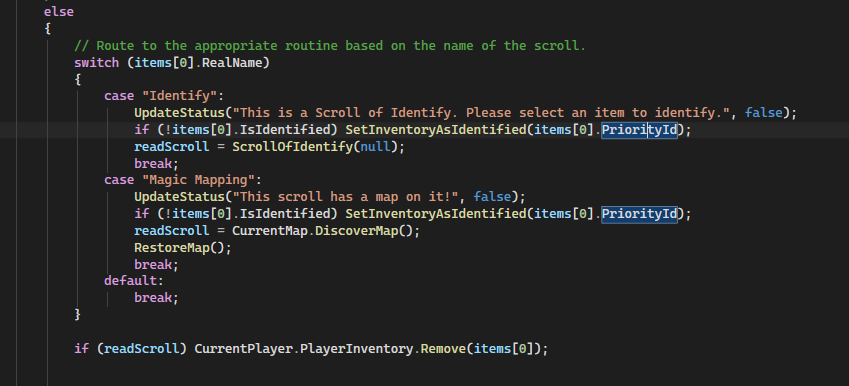
There are 19 different scroll types alone according to G.L. Sicherman’s Vade-Mecum and I’ll probably make that 20 at least because I like round numbers. There are probably an equal number of potions. This approach isn’t going to work.
The obvious solution was to introduce either Action or Func delegates like I did with the command keys. The problem here is that multiple classes are involved, the Game and Inventory classes, and I avoided this approach before because the delegates needed to be declared statically which caused too many problems. Looking at the code with semi-fresh eyes, there might have been another reason for that.
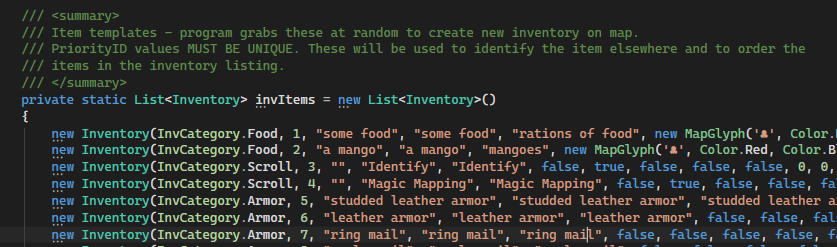
From what I can tell, I made the inventory list static so it could easily be accessed from any class but it’s only being used from the Game and MapLevel classes and it’s not difficult to create an instance since MapLevel was doing that anyway. I thought the delegates had to be static because they were in separate classes but there was actually another reason.
Originally, I wanted to use delegates as part of the Inventory class that would specify a procedure for each of the scrolls and potions and be automatically called. There were a number of problems with this.
- Different items might need different information which means different parameters for the procedure. I could just have a standard procedure signature that would accept the current Game object which contains references to all the other objects but it’s bad practice to provide that much access to a single function.
- Specifying the procedure in the Inventory class as part of one of the templates poses a couple of scope issues. If the handling procedure is in another class, like Game, it either has to be static which would prevent it from accessing the information for the current game and player, or the Inventory class would need a reference to the current Game object which I again didn’t want to do. Classes should be as independent of each other as possible and having to ensure that a Game object in the Inventory class is instantiated and current adds more potential for bugs.
I probably would have saved myself a lot of coding time this week if I’d looked that up earlier but I decided to find out for myself all over again.
Clearing the Static
After the template list becomes non-static, the Public collection also needed to be changed.
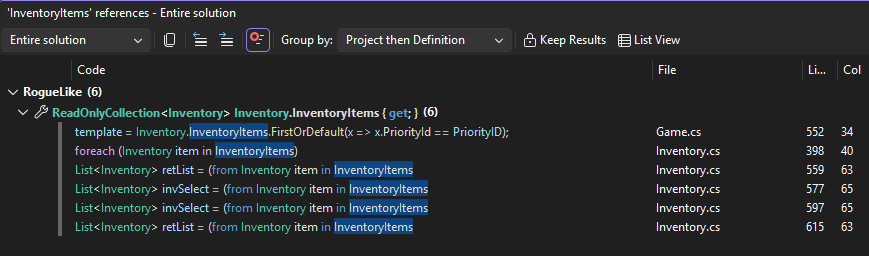
public ReadOnlyCollection<Inventory> InventoryItems => invItems.AsReadOnly();This introduced a few errors into the code for references to the static collection so I tried a new Inventory instance in the Game class.
/// <summary>
/// Game level Inventory instance for accessing functions.
/// </summary>
private Inventory GameInventory { get; }
I also needed a new Inventory class constructor that would create a dummy Inventory object and, while I was at it, I told it to go ahead and call InitializeInventory() to setup the obfuscated inventory names so the Game class doesn’t have to do that separately.
I also had to change the MapLevel constructor so it would require a reference to the GameInventory object in the Game class for reference. If we’re going to have an Inventory object in the game that tracks when objects are identified, we better make sure it’s referenced consistently. The Player class actually did reference the static GetAssignedInventory() function but I was able to create a simple dummy Inventory object for that.
I ran it to test … and it immediately failed with a StackOverflow error. Oops.
This happened because the Inventory class has two lists at class level – the Inventory template list (24 items) and the CodeNames List of Tuples (84 items) that supplies obfuscation names for any possible inventory item. That was fine so long as the lists were declared static and were only being instantiated once for the class itself. Once I removed the static designation, they were being instantiated for every single instance and, of course, the Inventory template list is actually a list of new Inventory instances. It turned into an infinite loop.
The solution was to move the instantiation of the lists out of the class level into methods that would only be run if the constructor requested that the inventory be initialized.
/// <summary>
/// Creates a dummy inventory object for use by Game class.
/// </summary>
public Inventory(bool InitInventory)
{
    // Setup inventory list with random code names.
    if (InitInventory) {
        LoadCodeNames();
        LoadInventory();
        InitializeInventory();
    }
}
private void LoadCodeNames()
{
this.CodeNames =
new List<Tuple<InvCategory, string>>()
{
new Tuple<InvCategory, string>(InvCategory.Ring, "agate"),
new Tuple<InvCategory, string>(InvCategory.Ring, "adamite"),
new Tuple<InvCategory, string>(InvCategory.Ring, "amethyst"),
new Tuple<InvCategory, string>(InvCategory.Ring, "beryl"),
...
private void LoadInventory()
{
    // Load inventory items into this instance of the class.
    this.invItems = new List<Inventory>()
    {
        new Inventory(InvCategory.Food, 1, "some food", "some food", "rations of food", new MapGlyph('♣', Color.Red, Color.Black), 20, true),
        new Inventory(InvCategory.Food, 2, "a mango", "a mango", "mangoes", new MapGlyph('♣', Color.Red, Color.Black), 20, false),
...
The Delegate Property
Once I had cleared out those issues, I tried adding a delegate to the Inventory class for handling scroll and potion effects, The first step was to add a new property to the class. I figured two input objects and a string output should be enough for whatever needed to be passed. I also made it nullable to allow for inventory items like food and armor that don’t need a delegate.
/// <summary>
/// Delegate function for inventory effects
/// </summary>
public Func<object, object?, string>? DelegateFunction { get; set; }
I then updated the constructors used for the Inventory templates to require the function to be passed so that it could populate the new property. I wanted to name existing functions as the delegate so I created a simple matching function to call and then updated a template in the new LoadInventory() method. The assignment of an existing function as a delegate was as easy as the assignment of an Action. The parameters don’t need to be spelled out.
public string IdentifyScroll(object T1, object T2)
{
    return "You have opened an Identify Scroll.";
}
new Inventory(InvCategory.Scroll, 3, "", "Identify", "Identify", false, true, false, false, false, 0, 0, 0, 0, 0, 0, 0, 15, new MapGlyph('♪', Color.Blue, Color.Black), IdentifyScroll),Instantiating the Inventory object does not require the input parameters to be passed for the delegate because that would be done later when I actually used the object. C# automatically verifies that the function being referenced requires the right set of parameters.
Then I did a quick test by sending some dummy data from the Game.ReadScroll() function.

Then I tested it … a-and it promptly failed right at that point.
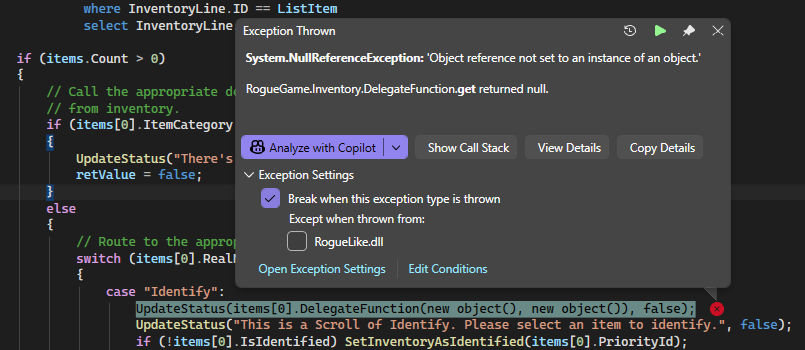
An inspection of the Locals collection of variables showed that the delegate function for this Identify scroll was, in fact, null.

That told me that, while the main inventory had the delegate assigned, the player’s inventory did not. I realized it came down to one of the Inventory constructors that wasn’t setting it. There were three and I had only changed the one that supplied affected the inventory template list items I needed.
Bingo …
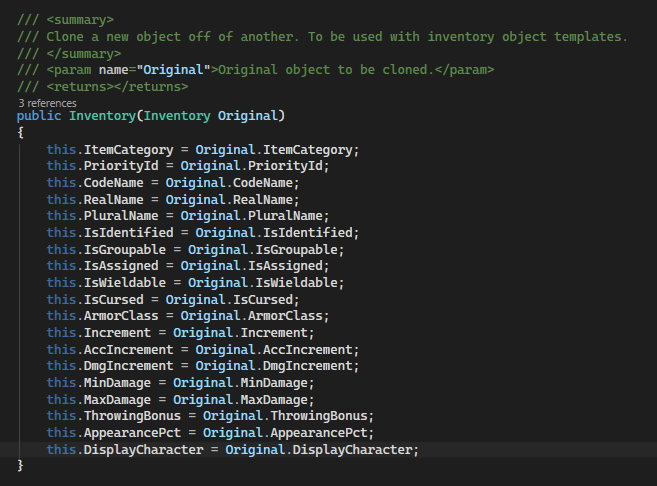
this.DelegateFunction = Original.DelegateFunction;I ran it again … and it worked!

Now that I had a working way to store an inventory delegate, I needed to change the Game.ReadScroll() method to call it as needed. That’s when I realized the problem I should have seen earlier.
public bool ScrollOfIdentify(char? ListItem)
{
    List<InventoryLine> lines;
    bool retValue = false;

    if (ReturnFunction != ScrollOfIdentify)
    {
        DisplayInventory();
        UpdateStatus("Please select an item to identify.", false);
        ReturnFunction = ScrollOfIdentify;
        retValue = true;
    }
    else
    {
        // Get the selected item.
        lines = (from InventoryLine in GameInventory.InventoryDisplay(CurrentPlayer.PlayerInventory)
                    where InventoryLine.ID == ListItem
                    select InventoryLine).ToList();

        if (lines.Count > 0)
        {
            // Update inventory template to Identified and then update player's inventory.
            SetInventoryAsIdentified(lines[0].InvItem.PriorityId);
            UpdateStatus(GameInventory.ListingDescription(lines[0].Count, lines[0].InvItem), false);
        }
        else
        {
            // Process non-existent option.
            UpdateStatus("That item doesn't exist.", false);
        }

        ReturnFunction = null;
        RestoreMap();
    }

    return retValue;
}
All the items in bold are from the Game class which oversees the program and has all kinds of access to other class resources. That left me with two options:
- Keep the handling procedures in the Game class, give the Inventory class access to the current Game object so the delegates can call the Game class procedures.
- Move the handling procedures to the Inventory class and pass the necessary resources with each one. Since different handlers will need different resources, the delegate needs to accept generic objects and the handlers have to verify and cast.
I didn’t like either option.
Regrouping
I really don’t mind that I spent all that time working out that option. Figuring out how put use the Func delegate as a class property could always be useful later, just not here. After thinking about the problem for a bit, I realized that only a subset of the Inventory items would require a delegate and many of the items would end up null so why was I trying to make it a property for all of them?
My next solution was to keep everything in the Game class; another Dicationary that would hold an identifier for the particular item and the delegate function that would reside in the Game class where it would have all the access it needed. I used both the Inventory category and name as the key. The names should be unique but you never know.
/// <summary>
/// Searchable dictionary field to hold delegates for inventory items.
/// </summary>
private Dictionary<(Inventory.InvCategory InvCat, string InvName), Func<bool>> InventoryActions;
There is only one scroll, the Scroll of Identify, that needs the user to select another item to apply it to so I decided to just use the Func<bool> signature which does not accept any arguments and just returns a boolean result which I can usually dispose of but might come in handy at some point.
I added the instantiation to the InitializeCommands() method right after the one for the KeyActions dictionary.
//Searchable dictionary field to hold delegates for inventory items.
InventoryActions = new Dictionary<(InvCategory InvCat, string InvName), Func<bool>>
{
    {(InvCategory.Scroll, "Identify"), ScrollOfIdentifyBegin},
    {(InvCategory.Scroll, "Magic Mapping"), ScrollOfMagicMapping}
};
Then, in the ReadScroll function, when the player selects an item to read, we just search the dictionary. and find the right delegate.
// Set the inventory item as identified if necessary.
if (!items[0].IsIdentified) SetInventoryAsIdentified(items[0].PriorityId);

// Find and invoke the delegate
if (InventoryActions.TryGetValue((Inventory.InvCategory.Scroll, items[0].RealName), out var taskInfo))
{
    // Remove the item from the player's inventory and invoke delegate.
    CurrentPlayer.PlayerInventory.Remove(items[0]);
    readScroll = taskInfo.Invoke();
}

// Remove the item from the player's inventory.
CurrentPlayer.PlayerInventory.Remove(items[0]);
I split the ScrollOfIdentify delgate into two since it could no longer receive an argument to specify the item to be identified and set the ReturnFunction to the second function. I had to make sure I removed the item from inventory before invoking the second Identify scroll function so that it would identify the correct item but, after that, things seemed to work fine.
public bool ScrollOfIdentifyBegin()
{
    bool retValue = false;
    UpdateStatus("This is a Scroll of Identify. Please select an item to identify.",
        false);
    DisplayInventory();
    ReturnFunction = ScrollOfIdentifyEnd;
    retValue = true;

    return retValue;
}
Since the function leaves the screen in Inventory mode, when the user presses a key, it calls the ReturnFunction as it’s been set and goes to the second function.
case DisplayMode.Inventory:
    // For letters, call the current return function.
    if (lowerCase >= 'a' && lowerCase <= 'z')
    {
        if (ReturnFunction != null)
            ReturnFunction(lowerCase);
    }
    keyHandled = true;
    break;
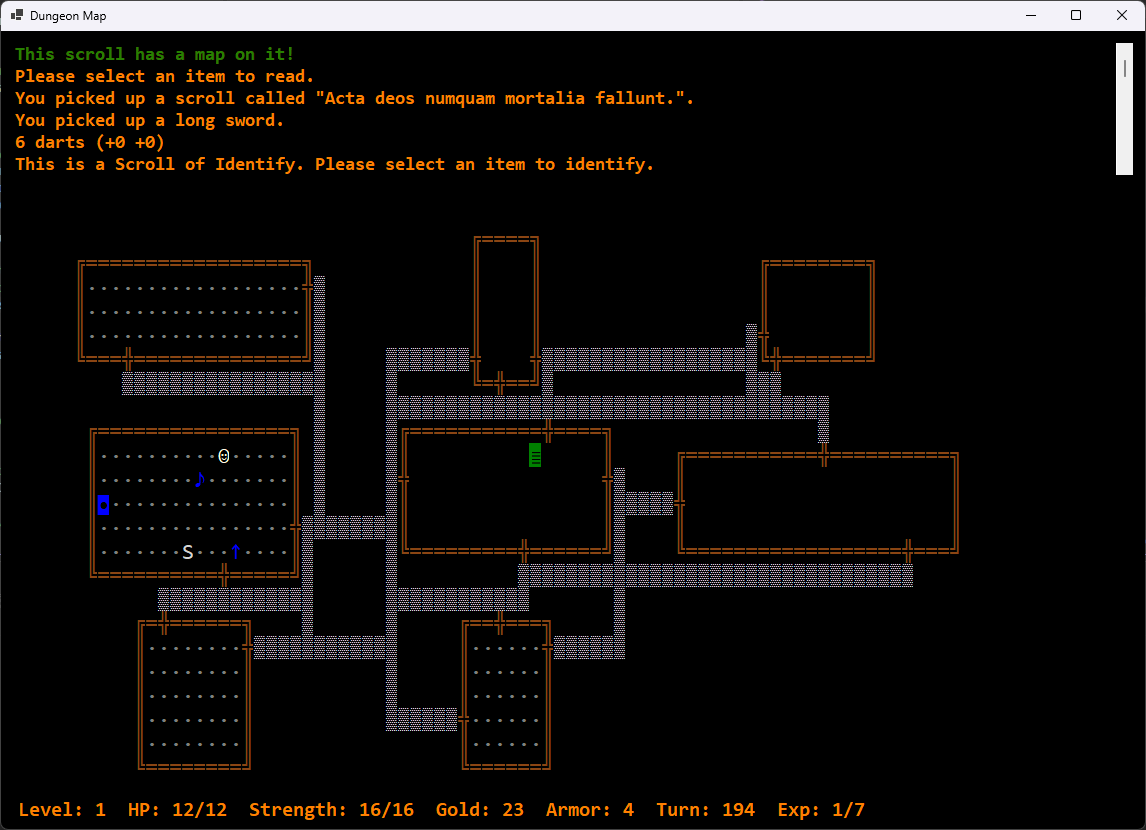
The ScrollOfMagicMapping() function is a lot simpler and just holds the code that was previously in the CASE statement.
private bool ScrollOfMagicMapping()
{
    // Reveal entire map
    UpdateStatus("This scroll has a map on it!", false);
    CurrentMap.DiscoverMap();
    RestoreMap();

    return true;
}
… and it works!
So, why is this better?
I actually started asking myself that after finishing this up. Maybe I could have avoided some work and kept the CASE statements neater by consistently having them point to procedures instead of holding all the code themselves. That would have allowed for different method signatures instead of restricting everything to one delegate type. If C# didn’t have something like a Dictionary type, maybe that’s what I would have done.
Of course, that would mean multiple CASE statements doing that since there are different functions for reading scrolls, quaffing potions, using wands, etc.. This way we have a single Dictionary that can define the functions for each object and a single list to search and maintain.
“One list to rule them all, one list to find them, one list to track them all and in the dungeon bind them …”
But that’s my preference and my reasoning. It makes no difference to the user so long as it works. It’s no faster. It keeps an extra object in memory but the amount of data is small. Again, another language might make another solution necessary. Another developer might have a different idea that looks a lot slicker. What matters is that it works well, consistently and reliably. After that, it needs to be supportable and avoid future problems by being easy to decipher and not encouraging developer error.
All of that is to say that there are plenty of challenges in development for which there is no best solution. Just one that causes fewer problems until a better solution is found.