In this chapter … I do some important code review of the MapLevel class which manages map construction and functions within the game. I also track down a few more bugs and look at some testing strategies specific to this roguelike game. Finally, I show how bugs can be accidently introduced through otherwise well-meaning code maintenance. Read more of the Rogue C# series here.
After refactoring the Inventory handling system, I started adding and testing some new scrolls to the game. In the process, I had to refamiliarize myself with the MapLevel class and all the mapping functions that I’d forgotten I’d created during the first journey through the dungeon. I also finally dealt with some bugs that had been crawling around and annoying me. It is at this point in development that I realized I’ve created a full-fledged piece of software with all the fun that goes with it.
This post is part of a series on creating a roguelike game in C#. For the latest chapters and more information, please visit the Official Project Page on AndrewComeau.com. The current code for this project is also available on Github.
Don’t miss the next chapter! Subscribe for free on Substack to be notified when new chapters are posted.
Sneaky Bugs
Some bugs are hard to trace down because they only happen sometimes. There was one that happened when my inventory list would get long enough that one of the selection letters matched a key command like ‘q’ for ‘Quaff potion’. After selecting an item to drop, the code would tell me I couldn’t drink it. The location of the bug was a little obvious once I was sure it was actually happening. I tracked it down to the KeyHandler() method I recently changed.
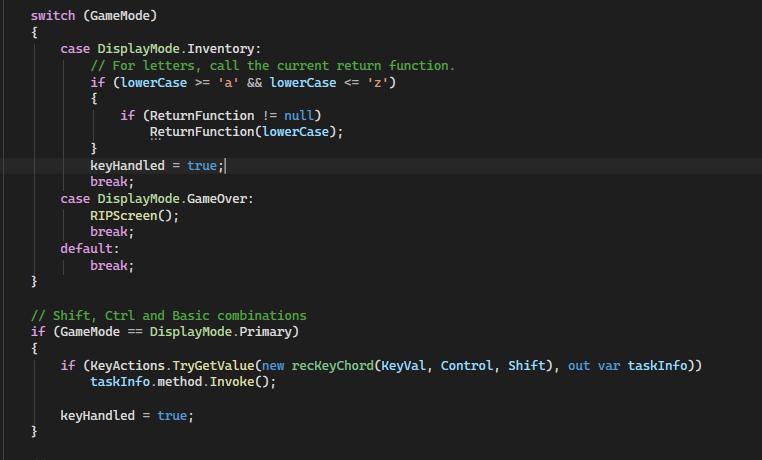
Sure, it seems like the DisplayMode inspection should keep the code from falling through to that second block but the ReturnFunction delegate in the first block is changing the DisplayMode and then the code is returning to KeyHandler(), hitting that second block and being treated like another command. In my enthusiasm to get rid of the long CASE statement that was previously dealing with key presses, I removed anything that would test keyHandled from that point.
Simple fix:
if (!keyHandled)
{
    // Shift, Ctrl and Basic combinations
    if (GameMode == DisplayMode.Primary)
    {
        if (KeyActions.TryGetValue(new recKeyChord(KeyVal, Control, Shift), out var taskInfo))
            taskInfo.method.Invoke();

        keyHandled = true;
    }
}
Finding Food
Some scrolls like Enchant Weapon and Enchant Armor are now easy to program. I just need delegate functions that adjust the properties of the player or their inventory.
private bool ScrollOfEnchantWeapon()
{
    // Increase the damage for the player's current weapon.
    if (CurrentPlayer.Wielding != null)
    {
        CurrentPlayer.Wielding.DmgIncrement++;
        CurrentPlayer.Wielding.IsCursed = false;
        UpdateStatus($"Your {CurrentPlayer.Wielding.RealName} gives off a bright flash of light.", false);
    }
    else
        UpdateStatus($"This is a scroll of enchant weapon. Too bad you aren't wielding one.", false);

    ReturnFunction = null;
    return true;
}
The Scroll of Food Detection was a little bit more involved. It reveals the location of any food on the map and I had to dig back into how I had actually defined how specific inventory items were stored on the map. I finally remembered that each item has a map location property. I also had to rediscover how items are actually marked as visible at any given point. Since I spent so much time looking into that, let’s do a review here.
Mapping Mechanics
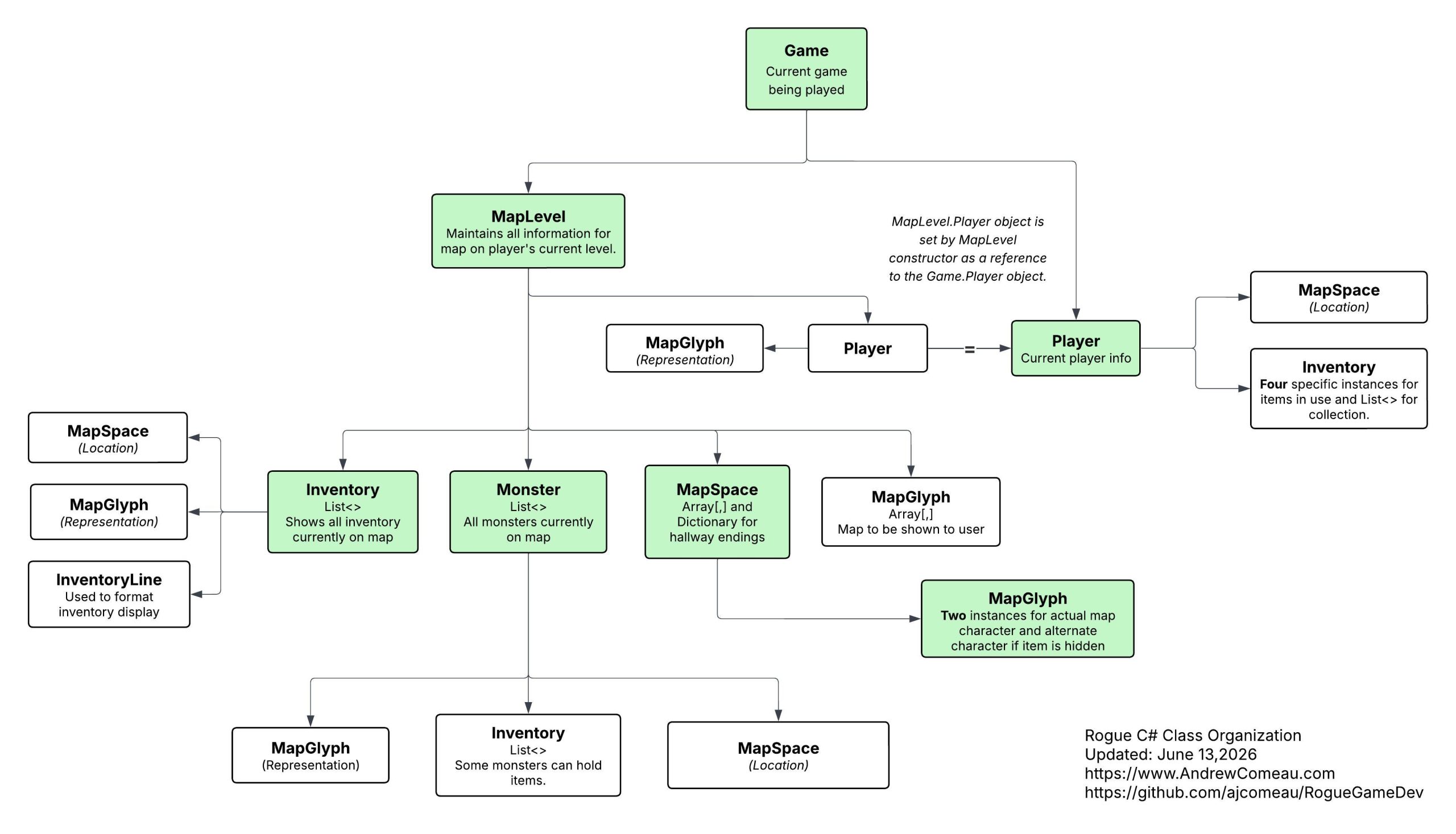
The MapLevel object maintains two arrays:
- levelMap is an 80 x 25 array of MapSpace objects that store all the information about what’s going on in each space on the map.
- DisplayMap is a 80 x 25 array of MapGlyph struct objects that defines what should actually be shown to the user based on the visible status of objects, rooms discovered, etc..
The MapLevel.MapText() method iterates through levelMap at the end of each turn and constructs DisplayMap for output to the form.
Inventory and Monsters are not actually stored in the MapSpace objects on levelMap. They are stored in the MapInventory and ActiveMonsters lists respectively. Each Inventory and Monster object has a Location property that stores a MapSpace with its location on the map. MapText() consults these lists when constructing DisplayMap to know where to put everything. The rest of the MapLevel class consults and updates them as needed to govern interactions between the player, inventory and monsters.
The MapSpace class holds the following information:
- MapCharacter (MapGlyph) – The actual character on the map, usually a wall, doorway, hallway or interior room space.
- AltMapCharacter (MapGlyph) – The character shown if the main character is needs to be search for like a doorway or trap.
- SearchRequired (boolean) – Some items like traps and doorways must be searched for even after the space is discovered.
- Discovered (boolean) – This indicates if the space has been discovered by the player. It can be used to make decisions based on newly discovered without affecting those previously discovered.
- RemoteSight (boolean) – This new property can be used by scrolls and other items to keep an item visible when the player is elsewhere on the map. Set to False by default.
- Lighted (previously Visible) (boolean) – Indicates if the space is to remain visible when the player moves away from it.
The MapGlyph struct is just a char value with color values for foreground and background.
The MapLevel class maintains all these properties for each space so MapText() can then make its decisions. Here are a few other key methods and functions:
- The ShroudMap() method sets all spaces on levelMap to Discovered = False and Visible = False in order to raise the Fog of War.
- The PriorityChar() function returns a MapGlyph indicating what should usually be shown, based on the following priority and MapText() uses this as a guide.
- Monsters
- Current Player (can’t be in the same space with a monster, anyway)
- Inventory (players and monsters can sit on top of it)
- If the space requires searching, MapSpace.AltMapCharacter
- MapSpace.MapCharacter
- GetOpenSpace() returns an unused space when something needs to be “placed on the map” by adding it to the correct list. It looks at all the interior room spaces, and optionally hallway spaces, and then excludes spaces listed as holding inventory, monsters or the player.
Getting hungry?
With that review in mind, let’s go back to the new DiscoverFood() function:
public bool DiscoverFood()
{
    // Set all the food on the map to discovered and visible.
    bool retValue = false;

    List<Inventory> mapInventory = (from Inventory inv in MapInventory
                             where inv.ItemCategory == Inventory.InvCategory.Food
                             select inv).ToList();

    mapInventory.ForEach(inv => {
        inv.Location.Discovered = true; inv.Location.Lighted = true;
        inv.Location.RemoteSight = true;
        retValue = true;
    });

    return retValue;
}
The function searches the MapInventory list for any food items and , for each one found, sets the Discovered, Lighted and RemoteSight properties to True. You’ll see later how MapText() works with these properties. The Game class method then calls it through a function that itself is defined as the delegate when the player opens the scroll.
private bool ScrollOfFoodDetection()
{
    bool retValue = false;
    // Reveal all the food on the map.
    retValue = CurrentMap.DiscoverFood();

    if (retValue)
        UpdateStatus("Your nose tingles as you smell food nearby.", false);
    else
        UpdateStatus("You hear a growling noise very close to you.", false);

    ReturnFunction = null;
    return retValue;
}
The player then sees something like this.
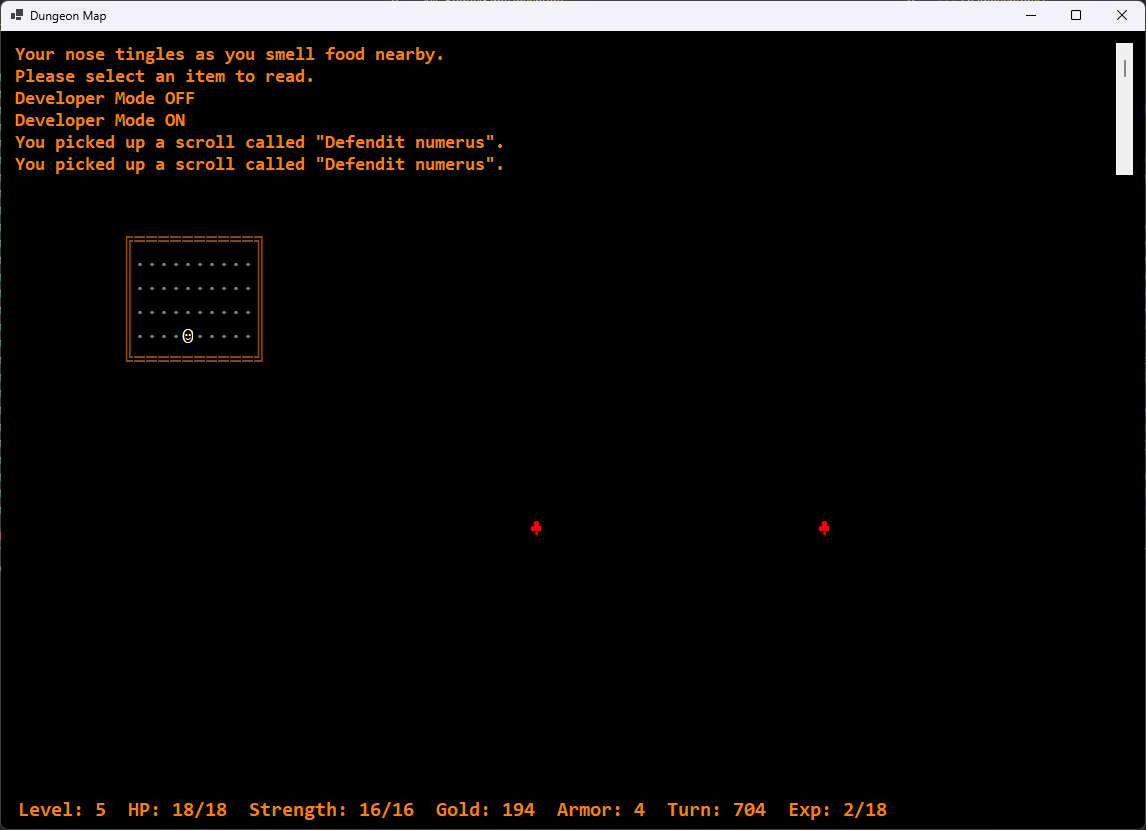
This is a bit different from the original game which didn’t show the location of the food but it could also be really stingy with food so I figured this was a nice change to help a player who might be in desperate straits. I tried to get a little more creative with the status updates but couldn’t think of anything that improved over the classic game … maybe later.
Shedding some light on things
I also needed a new LightUpRoom() function for the Scroll of Light which lights of the player’s current room.
private bool ScrollOfLight()
{
    // Reveal the current room.
    CurrentMap.LightUpRoom(CurrentPlayer.Location.X, CurrentPlayer.Location.Y);

    UpdateStatus("The entire room is lit by an unearthly glow.", false);
    ReturnFunction = null;

    return true;
}
public void LightUpRoom(int xPos, int yPos)
{
// Reveals a specific room, discovered or not.
// Get region limits
Tuple<MapSpace, MapSpace> corners = GetRegionLimits(xPos, yPos);
// For all room spaces in region, set Discovered = True and
// Lighted. Leave HALLWAY spaces alone and just focus on the room.
for (int y = corners.Item1.Y; y <= corners.Item2.Y; y++)
{
for (int x = corners.Item1.X; x <= corners.Item2.X; x++)
{
if (levelMap[x, y].MapCharacter.DisplayChar != HALLWAY.DisplayChar)
{
levelMap[x, y].Discovered = true;
levelMap[x, y].Lighted = true;
}
}
}
}I tried using the DiscoverRoom() function which the program calls whenever the player enters a room but neglected to actually review what it was doing first so I cost myself some time trying to figure out why it wasn’t working right. That function actually decides if a room should be lighted when the user enters and doesn’t touch any spaces that have already had Discovered set to True so it doesn’t override previous decisions if the user should enter a room twice.
But I don’t need to see through walls!
As I said, the MapText() method is where a lot of the decisions about what is going to be shown on the map happen. Unfortunately, some of those decisions weren’t going well.
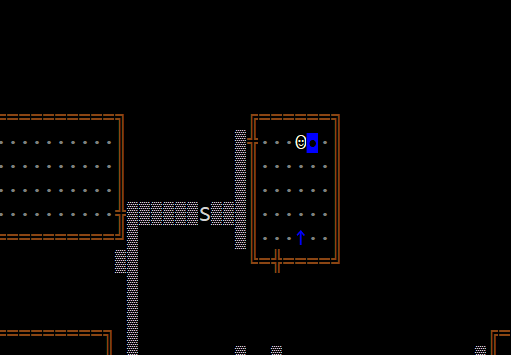
It’s not a huge deal but some of the monsters were showing up even if they were in the hallway while the player was in a room. They would appear and disappear which could be explained in-game by the character “hearing” a monster through the wall. That’s kind of interesting, I guess, but it’s a convenient confusion of bugs and “features” and I don’t like doing that,
I then got distracted by what I thought was a really messy algorithm in MapText() and spent way too much time trying to create a new one that would deal with the monster locations in relation to that of the player. This was partly because of my habit of combining boolean conditions in IF statements. It started to feel like a certain Monty Python scene involving castle guards.
Finally, I broke the conditions for monster visibility down one by one and realized that special decisions for the monsters were not required because a few tweaks to the rest of the method had already handled them just fine.
regionNo = GetRegionNumber(x, y);
// Get priority character
priorityChar = PriorityChar(levelMap[x, y], false);

// Determine if player is actually in the current region's room.
playerInRoom = (regionNo == playerRegion &&
            (RoomInterior.Contains(CurrentPlayer.Location.MapCharacter.DisplayChar)));

// If the space is within one space of the character, show standard
// priority character no matter what.
appendChar = surroundingSpaces.Contains(levelMap[x, y]) ? priorityChar : null;

// Otherwise, if the space is lighted, check if the player is in the same region and within
// the room's walls or if the space is marked for RemoteSight. If so, show the priority character.
// Else, just show the map character or the alternate map character as appropriate.
if (appendChar == null)
{
    if (levelMap[x, y].Lighted)
    {
        if (playerInRoom && RoomInterior.Contains(levelMap[x,y].MapCharacter.DisplayChar) || levelMap[x, y].RemoteSight)
            appendChar = priorityChar;
        else
            appendChar = (levelMap[x, y].SearchRequired) ?
                levelMap[x, y].AltMapCharacter : levelMap[x, y].MapCharacter;
    }

    if (appendChar == null) { appendChar = EMPTY; }
}
Organizing bugs into the code
If debugging is the process of removing bugs. Then programming must be the process of putting them in.
– Edsger Dijkstra
In cleaning up the MapLevel class, I thought it would be a neat idea to put stuff in a certain order. I moved lists like this one to the top.
/// <summary>
/// List of characters a player or monster can move onto.
/// </summary>
public static List<char> SpacesAllowed = new List<char>(){ROOM_INT.DisplayChar, STAIRWAY.DisplayChar,
    ROOM_DOOR.DisplayChar, HALLWAY.DisplayChar };
That moved it before the public static properties like ROOM_INT that it was referencing. What I forgot, or didn’t realize to begin with, is that C# initializes the class in the order it’s presented so that list ended up with four empty characters in it since the properties didn’t exist yet. Then, when the code tested to see if the player could move onto a space with code like this …
canMove = MapLevel.SpacesAllowed.Contains(visibleCharacter) ||
    (invFound != null && monster == null);
… the result was false and the player, and probably monsters, couldn’t move. That made for a very quiet game. No error resulted, the IDE didn’t call it out – the player just stood there doing nothing.
Simple solutions attract fewer bugs
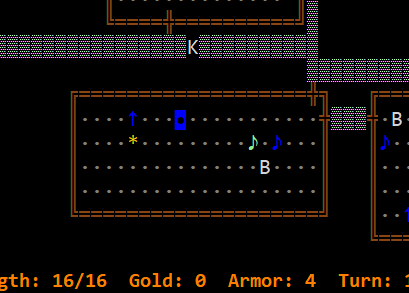
I was thinking of adding some new form controls to be shown in Developer mode (CTRL-D) that would let me force the program to insert specific inventory items on the map so I could test them easier. That seemed like a lot of work, however, and would require more testing on its own. Then I remembered that the Inventory class has an ApperancePct property to govern how often a specific item shows up. The MapLevel.AddInventory() function uses it.
// Place the inventory according to its chances of showing up.
if (rand.Next(1, 101) <= invItem.AppearancePct)
That means I could just increase this percentage on the desired item in Inventory.LoadInventory, relative to the other items to ensure that it shows up more. Since each Inventory item has its own MapGlyph to display it, the individual scroll types can be color coded if I want so the desired item can even be highlighted to distinguish it from other items of the same category.
(As you can see, I did this before fixing the monster issue in MapText().)
Hulk Mode
I got tired of being killed by monsters when I was trying to test other aspects of the game. Yes, I am getting whipped by my own game.
I looked at temporarily disabling the monsters or nerfing their fighting abilities but I don’t like doing temporary things like that because they can easily be left in place by accident. I decided to let the player blast through them instead and to make it something that could be turned on or off. I could have just turned off monster generation entirely but that affects an entire level at a time. Besides, it’s a little satisfying to be able to turn on Hulk Mode and go on a rampage. Cheat codes are fun.
Of course, the procedure for adding a key command has changed a little.
At class level:

private const int KEY_H = 72;
public bool HulkMode { get; set; }

In InitializeCommands():

KeyActions = new Dictionary<recKeyChord, (Action, string)>
{
{new recKeyChord(KEY_H, true, false), (HulkModeProc, "CTRL-H - Hulk mode (cheat)")},...

Then:

private void HulkModeProc()
{
    // Enable / disable hulk mode.
    // Monsters killed with a single punch.
    HulkMode = !HulkMode;
    UpdateStatus(HulkMode ? "Hulk Mode ON" : "Hulk Mode OFF", false);
}

Finally, in the player's Game.Attack() method ...

// Chance of landing a punch - 30% + (5% * XP level) - (5% * monster armor class).
// Hulk mode can be used for "testing" - certain punch with immediate kill.
hitChance = 50 + (5 * CurrentPlayer.ExpLevel) - (5 * Defender.ArmorClass);
hitSuccess = HulkMode ? true : rand.Next(1, 101) <= hitChance;
...
damage = HulkMode ? Defender.MaxHP : rand.Next(minDamage, maxDamage + 1);
So, with Hulk Mode on, the player has a 100% chance of a killing strike on the first punch. Have fun!
This is starting to feel like real software
Working through some of the challenges I’ve detailed here and reviewing the code I’d written a few years ago as if someone else wrote it, I started to realize I’ve created a real piece of software with all the development challenges that go with it. Don’t get me wrong, I’m still having fun but it definitely feels more like a real project with a life of its own.
Of course, I may have said that before.
For now, I will continue adding scrolls and potions. The new Hulk Mode might be a good potion that lasts a certain number of moves. When I need a break from that, I might go ahead and add the SQLite database to the game.