In this chapter … I add another inventory item to the game which requires a new way to add temporary abilities to the current player and results in another nullable Tuple property for the Player class. I also show my thought process behind integrating a new feature into existing code and how new features can help in the refinement of the program’s overall design. Read more of the Rogue C# series here.
The Scroll of Confuse Monster was the next scroll I decided to take on; I’m pretty much working through them in the order they’re presented in the Rogue’s Vade-Mecum. I’m mainly doing it this way to keep myself from handling all the easy ones first and leaving the hard ones for last where I might be tempted to compromise.
This post is part of a series on creating a roguelike game in C#. For the latest chapters and more information, please visit the Official Project Page on AndrewComeau.com. The current code for this project is also available on Github.
Don’t miss the next chapter! Subscribe for free on Substack to be notified when new chapters are posted.
Keeping the monsters more confused than me
The Scroll of Confuse Monster is a scroll that gives the player the power, for a certain number of turns, to confuse the next monster they attack and then the monster’s confusion lasts a certain number of turns so there are multiple steps to tackle here. In previous chapters, I mentioned how some properties of the Player class, such as Confused, were integers that would indicate the turn number at which the effect would end. We need something like that to indicate how long this inventory effect will last and what the game should do while it’s active.
Dedicated Player class properties like Confused, Immobile and Blind are set from different causes in the game. Now I need a property that can handle variable effects from different scrolls and potions for a certain number of terms so I’m thinking of a nullable Tuple object with the ending turn number and the delegate property. Tuples are relatively simple value types and should provide just what’s needed here.
/// <summary>
/// Tuple property to record ending turn for an inventory effect and
/// next delegate to be called when activated.
/// </summary>
public (int EndingTurn, Func<bool> TargetFunction)? InventoryEffect { get; set; } = null;
Ideally, this should be a List of tuples to allow for effects to be stackable but only have one inventory item that’s using it at this point and I just want to get it working. Even when there are more items to use it, the chances of a player having and using more than one of them at a time are low. I’ll upgrade it in a future update.
The next question is how the delegate that’s named will know what to do. This and other scrolls can target a specific monster, once, and then the scroll needs to go away. Right now, the current opponent is a local variable within the Game.MovePlayer() method, so no delegate will be able to see which monster to affect and I want the delegate to be an Func() just like the rest of the scroll delegates. My solution is to simply raise the opponent variable to class level in the Player class.
/// <summary>
/// If the player is currently in a fight, store the
/// opponent here.
/// </summary>
public Monster? Opponent { get; set; } = null;

In Game.MovePlayer():

CurrentPlayer.Opponent = (from Monster monst in CurrentMap.ActiveMonsters
                    where monst.Location == adjacent[direct]
                    select monst).First();

Attack(CurrentPlayer, CurrentPlayer.Opponent);
This will have the bonus effect of indicating to any code that can access the Player class whether there’s a fight currently happening, by virtue of the Opponent property not being null.
The Game.Attack() method is overloaded so that either the player or a monster can launch an attack and the game can respond appropriately.
private void Attack(Player Attacker, Monster Defender)
private void Attack(Monster Attacker, Player Defender)
I could simplify the first overload by just having it accept the Player object and then attack whatever monster is stored as the opponent but I’m going to leave it as it is for the sake of flexibility.
Let’s start writing the delegate in the Game class.
private bool ScrollOfConfuseMonsterBegin()
{
    //TODO: Review these values for possible new constants depending on other inventory effect ranges.
    int turns = rand.Next(100, 150);
    CurrentPlayer.InventoryEffect = (CurrentTurn + turns, ScrollOfConfusedMonsterEnd);
    UpdateStatus("Your hands begin to glow red.", false);

    ReturnFunction = null;

    return true;
}
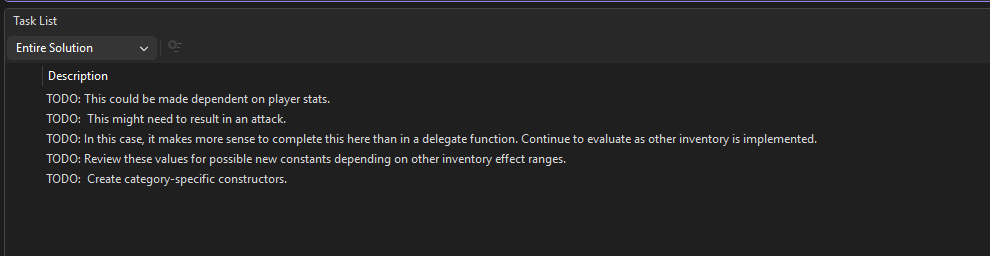
For now, 100 to 150 turns seems like the right length of time for the player to possibly find a monster to attack but I’m not sure yet. Defining the length of an inventory effect in the delegate function allows for flexibility between inventory items but the use of arbitrary values like those, potential magic numbers, kind of irks me so I through in a TODO hint to remind me to revisit it later. I have a few in the Task List at this point.
What does this thing do again … ?
Now, one of two things have to happen.
- If the player attacks a monster, the effect has to activate and end.
- If not, the effect has to end on its own.
The second one is simple enough. The EvaluatePlayer() method is called at the end of each turn by the CompleteTurn() method, so a new section will address any lingering effects that need to be cancelled.
// End any inventory effects if they haven't been used.
if (CurrentPlayer.InventoryEffect != null)
    if (CurrentPlayer.InventoryEffect?.EndingTurn <= CurrentTurn)
        CurrentPlayer.InventoryEffect?.TargetFunction.Invoke();
Note that when a Tuple property is nullable like this one, C# treats it as a Nullable(T) object and doesn’t directly expose the named members. You not only have to check for null as the first line is doing but you also have to either use the null-conditional operator as shown above or look at the Value property like this:
CurrentPlayer.InventoryEffect.Value.EndingTurnNow that we have that path taken care of, we need to look at the one where the player actually uses the effect on a monster. For that, I’ll go back to the Game.Attack() method. After the method calculates the chance of the player hitting the monster, a successful hit will trigger the scroll ability.
if (hitSuccess)
{
    UpdateStatus($"You hit the {Defender.MonsterName.ToLower()}.", false);
    damage = HulkMode ? Defender.MaxHP : rand.Next(minDamage, maxDamage + 1);

    if (CurrentPlayer.InventoryEffect != null)
        CurrentPlayer.InventoryEffect?.TargetFunction.Invoke();
}
This is where I realize that I’ve written a potential problem into the code. The delegate is going to target the Player.Opponent Monster object but I’ve allowed the Attack() method to accept another Monster object which opens the possibility that the Opponent property will be null and the delegate will fail. I’ve created an unreliable requirement that any code calling Attack() must set the Opponent property first.
Since I don’t want the delegate to have to accept a Monster object, my solution is for MovePlayer() class to go back to sending its own Monster object to the Attack() method and for Attack() to set the Player object’s Opponent property at the start of the method and then to set it to null if the monster is defeated.
else if (monster != null)
{
    Monster opponent = (from Monster monst in CurrentMap.ActiveMonsters
                        where monst.Location == adjacent[direct]
                        select monst).First();

    Attack(CurrentPlayer, opponent);

    // Player turn completed.
    turnComplete = true;
}
You might be wondering why, since there’s a Monster object defined on the first line, I had to search for the opponent monster again. That’s a great question and I can’t, for the life of me, think of why I did that back in 2023. I’m sure it seemed like a fantastic idea at the time but it doesn’t now so that I took tht step out, tested and it worked just fine (at first). I know, because I got killed twice more by monsters I was facing – they were definitely the right objects.
Opening the scroll
Then we come to the second delegate, ScrollOfConfusedMonsterEnd(). Anywhere from two to seven turns seemed right from my past playings. This delegate will need to be called whether the player is using the scroll or the effect is simply ending so it’s written to allow for the possibility that there is no opponent.
private bool ScrollOfConfusedMonsterEnd()
{
    if(CurrentPlayer.Opponent != null)
    {
        CurrentPlayer.Opponent.Confused = CurrentTurn + rand.Next(2, 7);
        UpdateStatus($"The {CurrentPlayer.Opponent.MonsterName.ToLower()} appears confused.", false);
    }

    CurrentPlayer.InventoryEffect = null;
    UpdateStatus("Your hands stop glowing red.", false);

    return true;
}
Of course, that has to actually do something so we come back both overloads of Game.Attack() and insert some code to nerf the attacker if they’re confused. I say both overloads because we’ll eventually have items that confuse the player so we might as well take care of it now.
if (Attacker.Confused > 0)
    hitChance = (int)(hitChance * 0.25);
Dropping the chance of scoring a hit by 75% should be good for now. In the original game, confusion would cause either the monster or the player to move randomly but the MoveMonster() method needs some serious cleanup from what I can see so, for now, I’m just going to use it to evaluate if it’s time for the monster to snap out of whatever funk it’s in and remember where it is. I’ll add some movement effects later.
// If the monster is confused, paralyzed, blind, decide if it's time to snap out of it.
if (monster.Confused > 0 && monster.Confused <= CurrentTurn)
    monster.Confused = 0;

if (monster.Immobile > 0 && monster.Immobile <= CurrentTurn)
    monster.Immobile = 0;

if (monster.Blind > 0 && monster.Blind <= CurrentTurn)
    monster.Blind = 0;
I also added this code to the EvaluatePlayer() method to do the same for the player.
Scrolls have fine print, too.
Testing the changes, I found a new and strange bug where monsters were attacking me twice for every attack I launched on them. It wasn’t happening all the time but it wasn’t supposed to happen at all. Stepping through the code, I found that the Game.CompleteTurn() method was being called twice. This is the method that cycles through the active monsters to move them and, if the player is immobile for any reason, increments the turn number and keeps the monsters moving until the player can move again.
CompleteTurn() was always called at the end of MovePlayer() and KeyHandler() but the call evidently wasn’t being hit twice. Something about the elimination of the extra monster search and the recent changes to KeyHandler() seem to have combined to cause the extra call, although I’m not exactly sure why. In any case, code cleanup is in order – at least so I can have a clear understanding of how the code is working.
private void CompleteTurn()
{
    do
    {
        // Perform whatever actions needed to complete turn
        // (i.e. monster moves)
        foreach (Monster monster in CurrentMap.ActiveMonsters)
            MoveMonster(monster);

        // Then, evaluate the player's current condition.
        EvaluatePlayer();
        // Increment current turn number
        CurrentTurn++;

        if (CurrentPlayer.Immobile > 0)
        {
            CurrentPlayer.Immobile = CurrentPlayer.Immobile <= CurrentTurn ? 0 : CurrentPlayer.Immobile;

            if (CurrentPlayer.Immobile == 0) UpdateStatus("You can move again.", false);
        }
    } while (CurrentPlayer.Immobile > CurrentTurn);

    // End turn
    TurnInProgress = false;
}
The Game class had a startTurn boolean property that was being used to indicate any action on the user’s part that needed to start an actual turn that monsters needed to respond to. I could see that it wasn’t being set to false so I first renamed it to TurnInProgress for clarity and then changed the CompleteTurn() method to set it to false. KeyHandler() already has the following check which will cover things.
// Complete turn if one was started.
if (TurnInProgress) CompleteTurn();
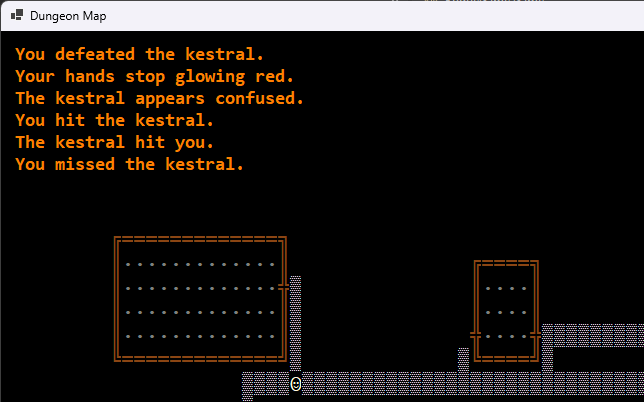
Testing the program again, it works.
Leveling up
With these changes, the game now has a way to grant the player a temporary ability that can either expire or be turned off. This can be used for other scrolls and potions, maybe even for new ones like the Hulk Mode that I showed in the last chapter.
Also, notice that every new inventory item that’s introduced not only adds a feature but helps to refine the project’s code and root out design issues. It’s a type of stress testing and proof of the program’s architecture. It’s a specific benefit to a game that has a series of features which can be added modularly.