In this chapter … I refactor the code to remove unnecessary references to literal string values that can easily break and add a new class property to automate the assignment of inventory to the player. Read more of the Rogue C# series here.
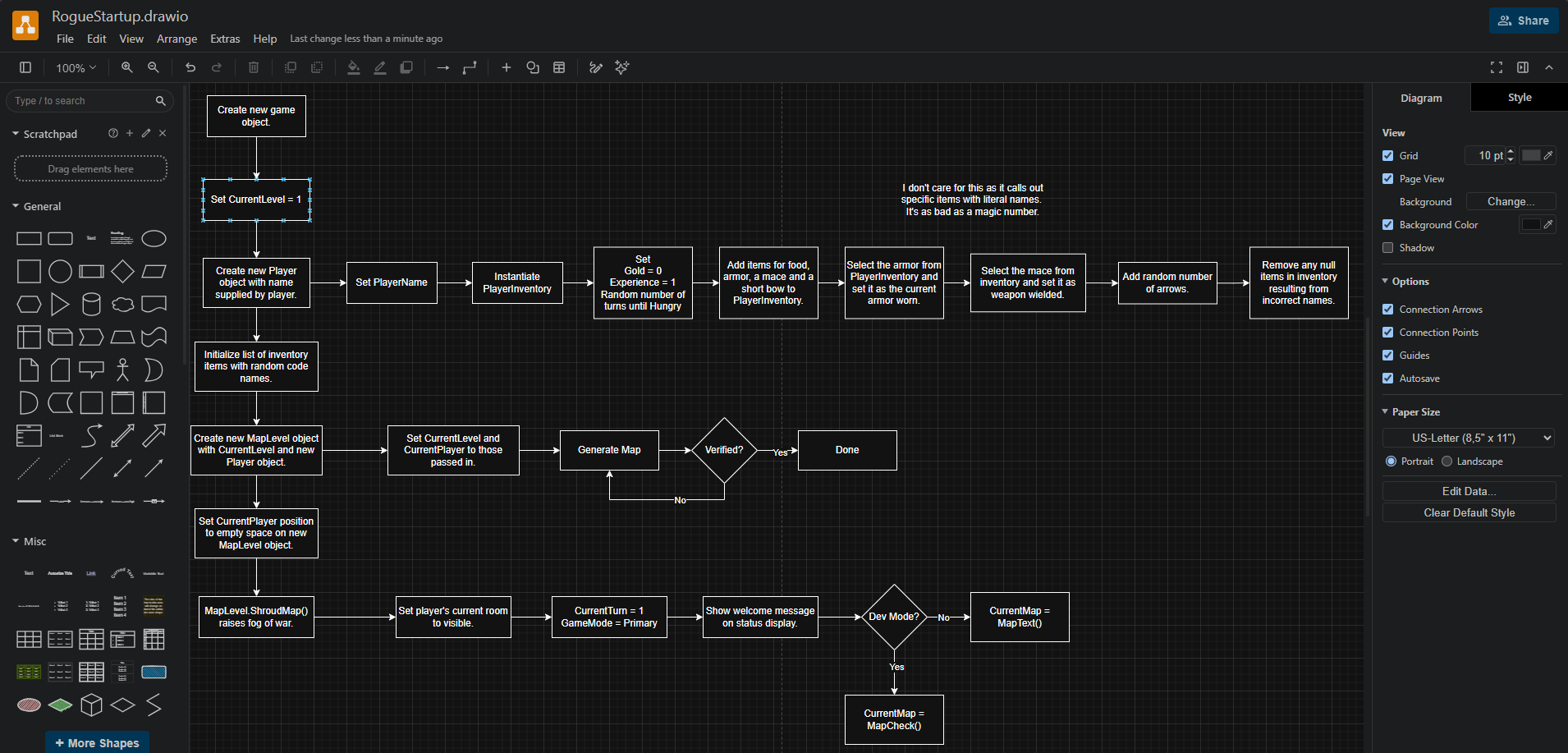
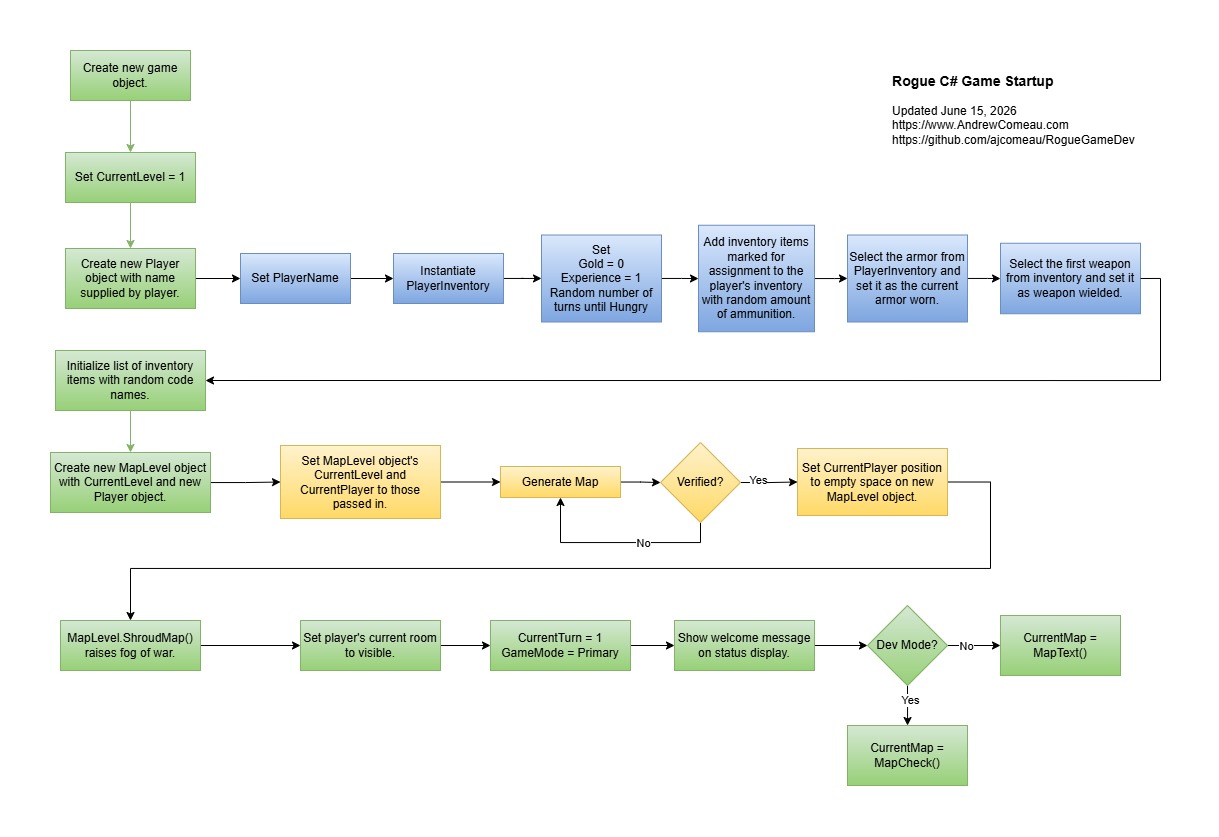
I know, I’m crazy for flowcharts lately but I find they are the best way to get an overview of a code process like the ones in this project. I think making one is actually more productive than having it on hand as it helps me to question every step of the process.
I found Diagrams.net (formerly Draw.io) again and switched to it for this latest diagram. The other options wanted too much money for a tool that I only need occasionally and Draw.io is committed to being free and open source and it’s an excellent tool.
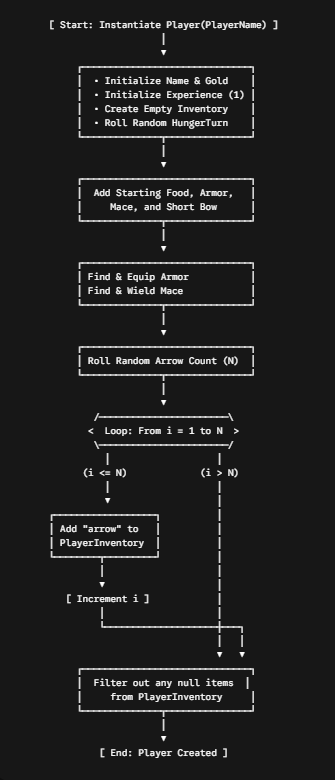
I actually tried having A.I. generate the flow based on part of the code with the simple prompt “Can you generate a flowchart from the following code?“. I don’t know if Gemini was being cute because the game is an RPG but it acutally went with an ASCII rendering.
ChatGPT went with a graphic format but basically just repeated the code.
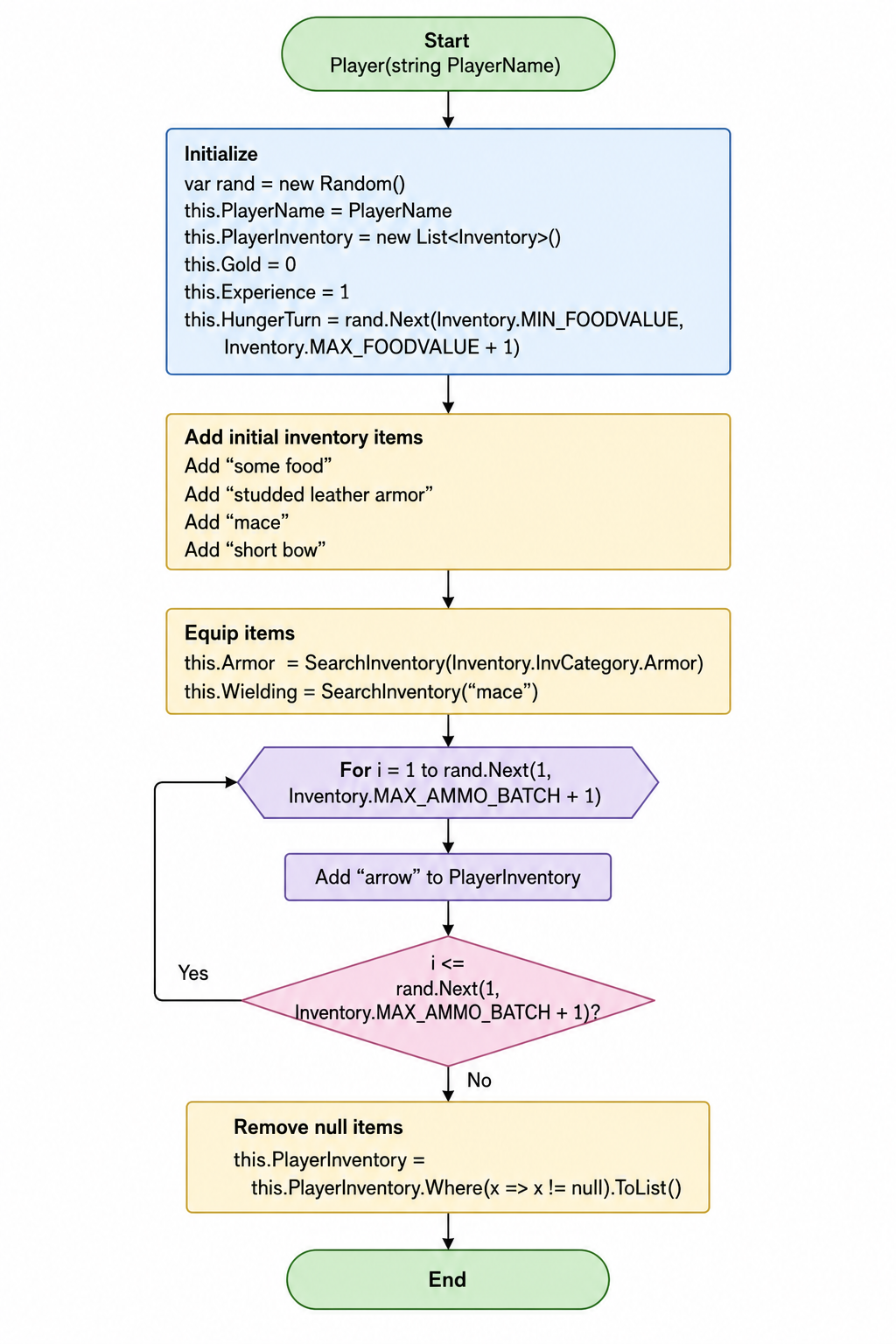
Neither of those solutions worked for me but the biggest problem was that, by having A.I. analyze the code for me, I would avoid that work myself and not get the benefit of actually understanding the code. The very process of stepping through the lines and asking “What is this doing and why?” at each point is something an A.I. can’t do for you. So, I started on my own flowchart.
This post is part of a series on creating a roguelike game in C#. For the latest chapters and more information, please visit the Official Project Page on AndrewComeau.com. The current code for this project is also available on Github.
Don’t miss the next chapter! Subscribe for free on Substack to be notified when new chapters are posted.
Setting up the game
My focus for this chart was the process that happens right at the start of the game after the user inputs their name and clicks Start. The program immediately creates a new Game object, the constructor for which creates the player, the map and generally sets up everything else. This includes the mapping process that I created a chart for in a previous chapter.
It all works and generally makes sense but I stopped when I got to the point in the Player class constructor where the player is assigned some items to start with.

The GetInventoryItem() function has a couple of overloads. This one accepts the name of the item and searches the list of available inventory templates for that name. I suppose it’s okay but, as I’ve said before, I don’t like specifying literal values like this. What happens if I have a brain fart and change the names in the template without remembering that these lines are referencing them? There’s nothing in Visual Studio that will recongize this link and call it out.

Yeah, that’s cute. Turns out that overload of GetInventoryItem() will return a null if it doesn’t find the specified item and then the Player constructor just ends by filtering the nulls out of the player’s inventory and calls it good. Meanwhile, our player is left without a mace for defense and gets sat on by the first orc that comes along. Okay, sure, it probably gets caught in testing but I still don’t like it.
Assigning Inventory
Our Inventory class just got a new property.
/// <summary>
/// Is the item assigned to the player at the start of the game?
/// </summary>
public bool IsAssigned { get; set;  }
Instead of calling them out by name, we can just define the items themselves as assigned at the beginning of the game. This means the three overloads of the Inventory class constructor need to be updated to set the property and receive an argument for it, if necessary.
That means the list of inventory templates also need to be updated to specify if each one is assigned or not.
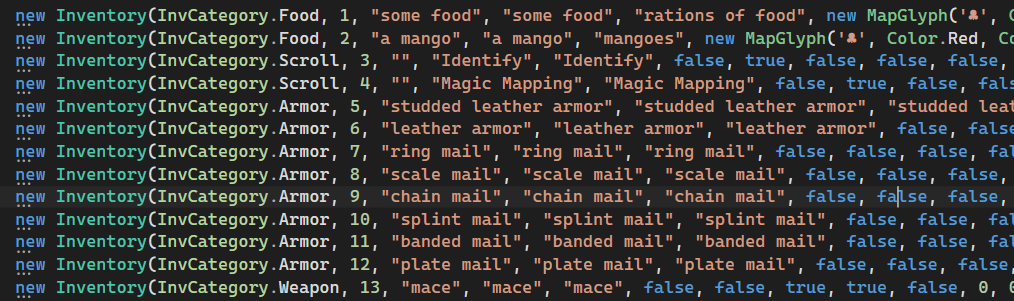
This is another thing that needs to be changed but not right now. This template list begs to be stored in a program database rather than this confusing CSV list of instantiators. Sometime soon, I need to add a SQLite database to the program and move it all there. It will be a significant refactor but it needs to happen anyway because that database will also store the scoreboard and a saved game.
Now, we need an inventory function to get a list of the inventory to be assigned.
/// <summary>
/// Get the list of inventory assigned at the start of the game.
/// </summary>
/// <returns></returns>
public static List<Inventory>? GetAssignedInventory()
{

    List<Inventory> retList = (from Inventory item in InventoryItems
                               where item.IsAssigned
                               select item).ToList();

    // Clone a new object from template.
    if (retList.Count > 0) return retList; else return null;
}
The Player class constructor then gets an update. It pulls the assigned inventory at the beginning and then iterates through it. For ammunition, it adds a random number as before and then just adds everything else. There are no nulls to clear – there’s either a list or there isn’t.
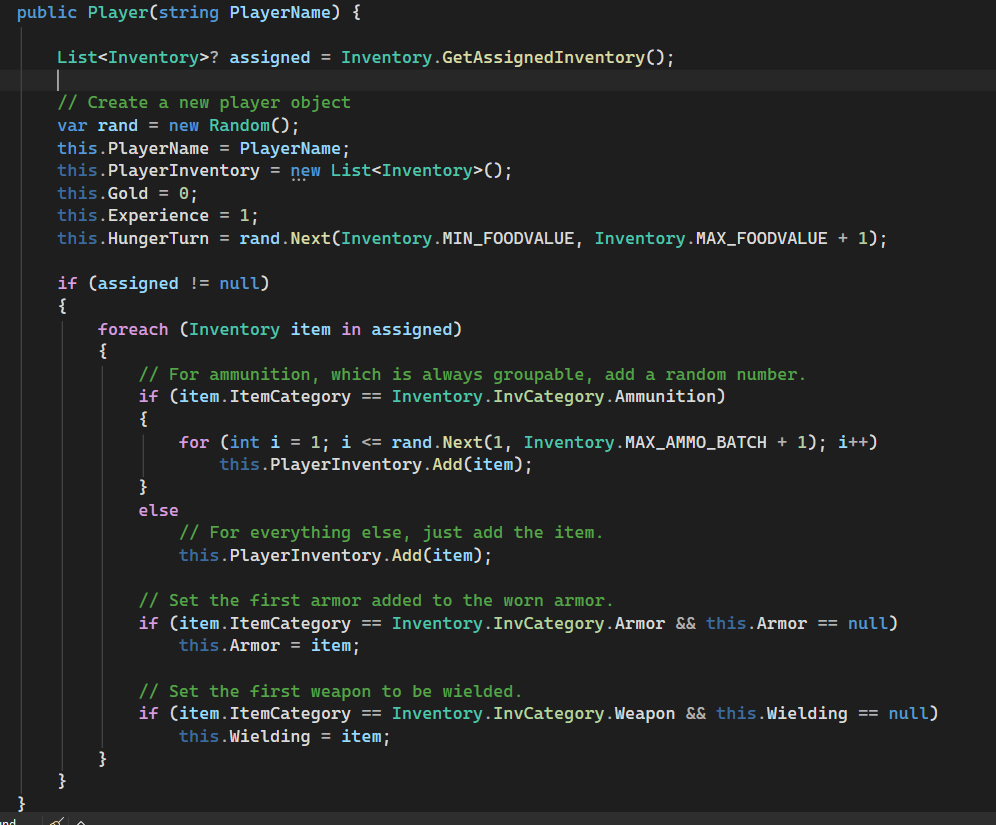
I had to make an adjustment where only the first weapon in the list would be wielded after my first test gave the player a crossbow to wield. They’re pretty bad as a melee weapon. Othewise, it worked right away.
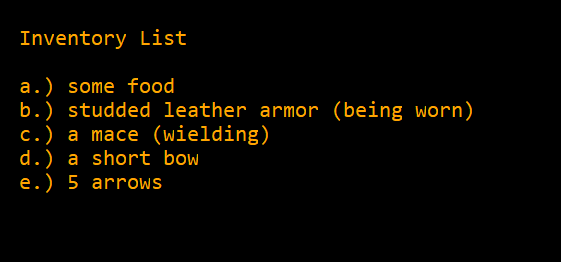
Everything in its place
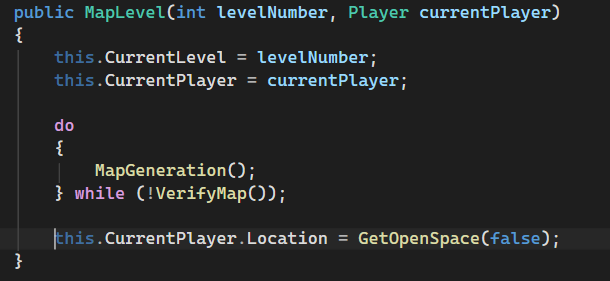
Another minor issue was that the Game class constructor was setting the starting position of the player on the map. As mentioned in the last chapter, the MapLevel class has access to the CurrentPlayer object so it could just as easily do it right after completing the map creation.
Does it make any difference? Not functionally, but it’s a little more logical for the MapLevel class to call its own GetOpenSpace() function than to wait and return to the Game class constructor and have it done from there. It keeps the code concerns straight.
Now that we have that straightened out …
This newest flowchart will be available in the documentation included with the code on Github.
Until next time, stay safe in the dungeon!